
Having troubles selecting CUDA for OpenMM
-
I am trying to do some MD with SAMSON via the OpenMM wizard. I have the latest CUDA (13.2) but also 12.8 version. If I do the computations outside SAMSON it works just fine but when trying to select CUDA from the parameter it says that there is no CUDA or Nvidia card. I have also set SAMSON to run on the nvidia card (5060rtx 8gb vram laptop).
-
I am trying to do some MD with SAMSON via the OpenMM wizard. I have the latest CUDA (13.2) but also 12.8 version. If I do the computations outside SAMSON it works just fine but when trying to select CUDA from the parameter it says that there is no CUDA or Nvidia card. I have also set SAMSON to run on the nvidia card (5060rtx 8gb vram laptop).
Hi @Federico-Maria ,
Do you have the same problem with both CUDA versions - 13.2 and 12.8 - or only for the latest one, 13.2?
For now, you can create a script to run OpenMM with OpenMM Wizard and then modify the architecture parameter to use CUDA.
Could you please tell us what is shown as GPU in Help > About SAMSON? -
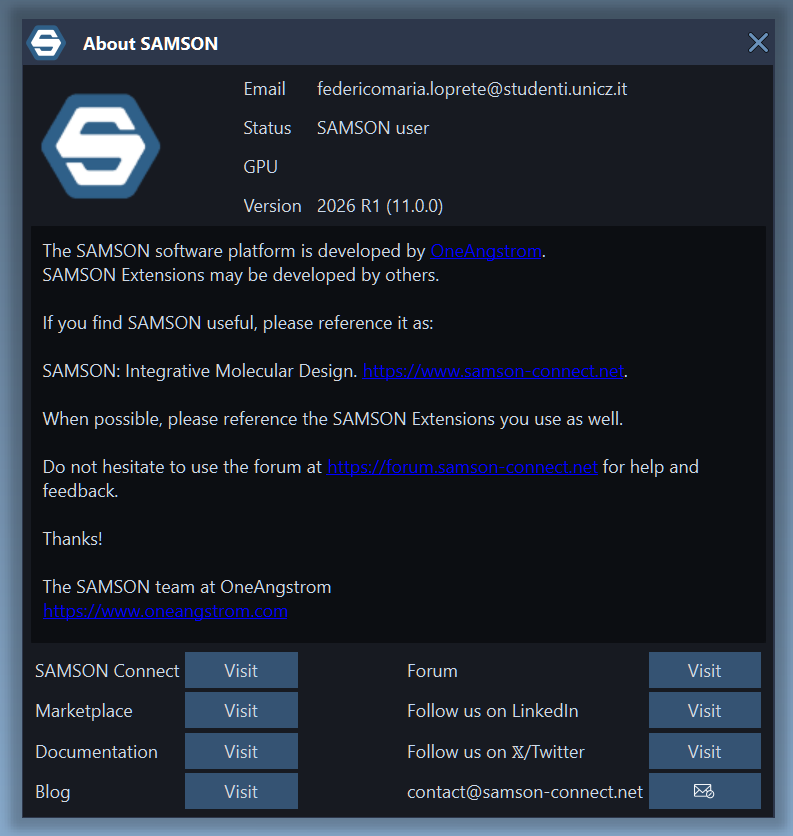
As you can see the gpu is absent.
At first I had only CUDA 13.2 and I had this problem. Then, looking around I've found that maybe way the CUDA version so I installed 12.8 but same -
As you can see the gpu is absent.
At first I had only CUDA 13.2 and I had this problem. Then, looking around I've found that maybe way the CUDA version so I installed 12.8 but same@Federico-Maria,
Thank you for your reply!I see the issue - it seems that SAMSON failed to properly identify the GPU, and the OpenMM Wizard takes the GPU info from SAMSON, so it thinks that there is no GPU.
You are using Windows, right?
Could you please run the following code in PowerShell and copy here the output:Get-CimInstance Win32_VideoController | Select-Object Name, DriverVersion, AdapterRAM, VideoProcessorBased on this, I can patch OpenMM Wizard for you.
-
-
Yes, I am running win11
Here the output

@Federico-Maria ,
Thanks!
I've patched the OpenMM Wizard on Windows - it should be updated automatically for you once you restart SAMSON.
Could you please check whether it now works for you, and you can use OpenMM Wizard with CUDA 13? -
Ok, thanks to you! Now it makes me select CUDA in the advanced parameters and the tipology like single, mixed or double. I'll give it a try. Just to mention, when controlling the Help>About SAMSON section the GPU is still absent, but again just to tell you since now openmm sees CUDA. I will update to you as soon as possible
-
Ok, thanks to you! Now it makes me select CUDA in the advanced parameters and the tipology like single, mixed or double. I'll give it a try. Just to mention, when controlling the Help>About SAMSON section the GPU is still absent, but again just to tell you since now openmm sees CUDA. I will update to you as soon as possible
@Federico-Maria ,
Great! Thanks for checking!Thanks for mentioning, the thing in 'About SAMSON' will be fixed with the next patch release of SAMSON.

Hello! It looks like you're interested in this conversation, but you don't have an account yet.
Getting fed up of having to scroll through the same posts each visit? When you register for an account, you'll always come back to exactly where you were before, and choose to be notified of new replies (either via email, or push notification). You'll also be able to save bookmarks and upvote posts to show your appreciation to other community members.
With your input, this post could be even better 💗
Register Login