
SAMSON with hybrid graphics cards (Intel/Nvidia)
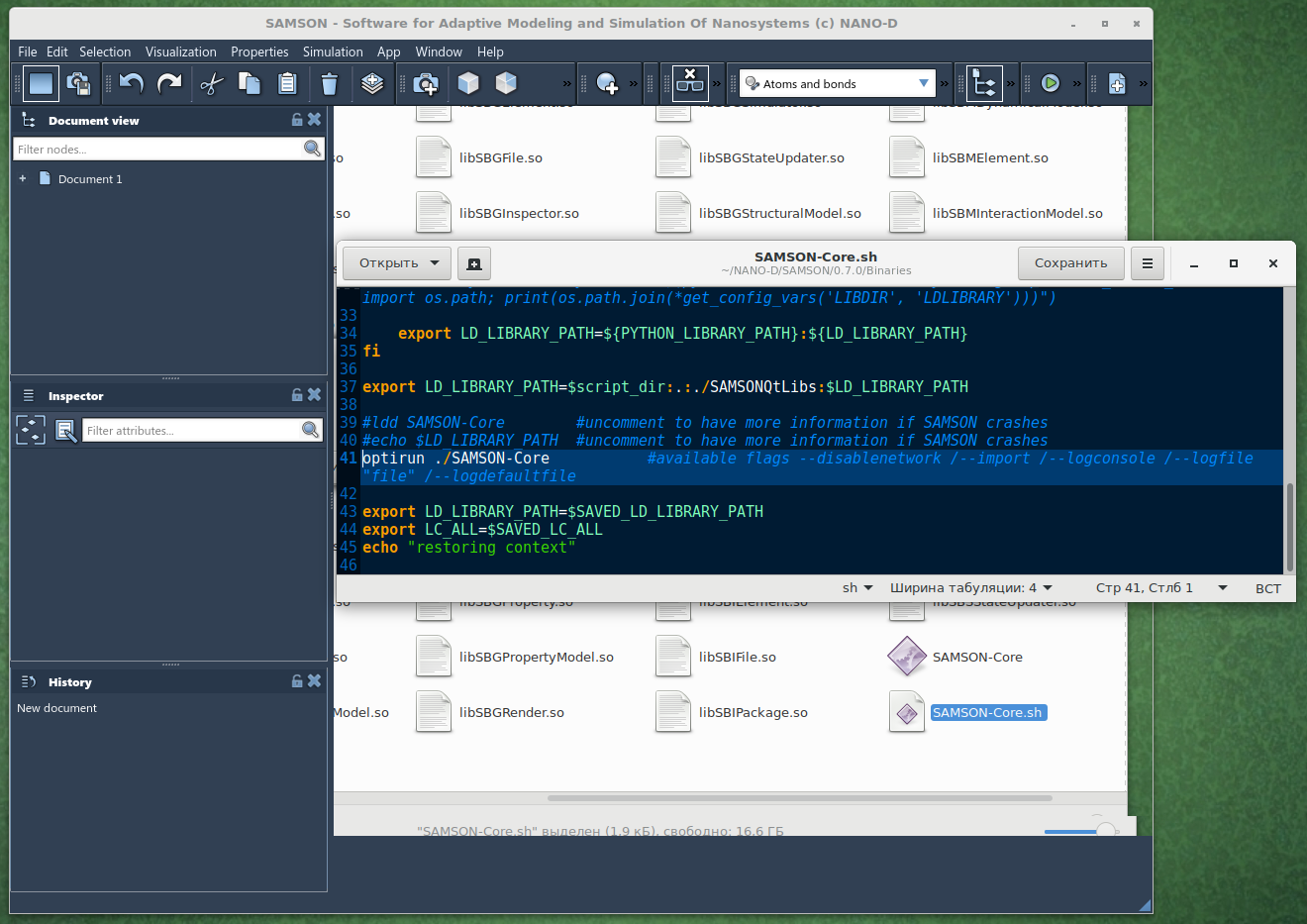
-
Thank you @Ivan for reporting this issue!
It might be a problem specific to
optirunor toOpenGL. Do you have libGL installed via nvidia drivers or mesa-utils?Could you, please, check dependencies for
SAMSON-Core:cd ~/NANO-D/SAMSON/0.7.0/Binaries ldd ./SAMSON-Core | grep gl ldd ./SAMSON-Core | grep GLIn particular, is
libGL.so.1the correct one?And could you, please, run and post the output for
optirun glxinfo | grep OpenGLdia@lenovo:~/NANO-D/SAMSON/0.7.0/Binaries$ ldd ./SAMSON-Core | grep gl libglib-2.0.so.0 => /lib/x86_64-linux-gnu/libglib-2.0.so.0 (0x00007fa0eba45000) dia@lenovo:~/NANO-D/SAMSON/0.7.0/Binaries$ ldd ./SAMSON-Core | grep GL libOpenGL.so.0 => /usr/lib/x86_64-linux-gnu/libOpenGL.so.0 (0x00007fdd14161000) libGLX.so.0 => /usr/lib/x86_64-linux-gnu/libGLX.so.0 (0x00007fdd13f2f000) libGLU.so.1 => /usr/lib/x86_64-linux-gnu/libGLU.so.1 (0x00007fdd13cc0000) libSBGLog.so => not found libQt5OpenGL.so.5 => /usr/lib/x86_64-linux-gnu/libQt5OpenGL.so.5 (0x00007fdd13c66000) libGLdispatch.so.0 => /usr/lib/x86_64-linux-gnu/libGLdispatch.so.0 (0x00007fdd121e6000) libGL.so.1 => /usr/lib/x86_64-linux-gnu/libGL.so.1 (0x00007fdd117e4000) dia@lenovo:~/NANO-D/SAMSON/0.7.0/Binaries$ optirun glxinfo | grep OpenGL OpenGL vendor string: NVIDIA Corporation OpenGL renderer string: GeForce GTX 1050/PCIe/SSE2 OpenGL core profile version string: 4.5.0 NVIDIA 390.87 OpenGL core profile shading language version string: 4.50 NVIDIA OpenGL core profile context flags: (none) OpenGL core profile profile mask: core profile OpenGL core profile extensions: OpenGL version string: 4.6.0 NVIDIA 390.87 OpenGL shading language version string: 4.60 NVIDIA OpenGL context flags: (none) OpenGL profile mask: (none) OpenGL extensions: dia@lenovo:~/NANO-D/SAMSON/0.7.0/Binaries$ optirun ldd ./SAMSON-Core | grep gl libglib-2.0.so.0 => /lib/x86_64-linux-gnu/libglib-2.0.so.0 (0x00007f21ab7ff000) dia@lenovo:~/NANO-D/SAMSON/0.7.0/Binaries$ optirun ldd ./SAMSON-Core | grep GL libOpenGL.so.0 => /usr/lib/x86_64-linux-gnu/libOpenGL.so.0 (0x00007f440f894000) libGLX.so.0 => /usr/lib/x86_64-linux-gnu/libGLX.so.0 (0x00007f440f662000) libGLU.so.1 => /usr/lib/x86_64-linux-gnu/libGLU.so.1 (0x00007f440f3f3000) libSBGLog.so => not found libQt5OpenGL.so.5 => /usr/lib/x86_64-linux-gnu/libQt5OpenGL.so.5 (0x00007f440f399000) libGLdispatch.so.0 => /usr/lib/x86_64-linux-gnu/libGLdispatch.so.0 (0x00007f440d915000) libGL.so.1 => /usr/lib/x86_64-linux-gnu/primus/libGL.so.1 (0x00007f440cf62000)about libGL version. I can provide synaptic screenshot.
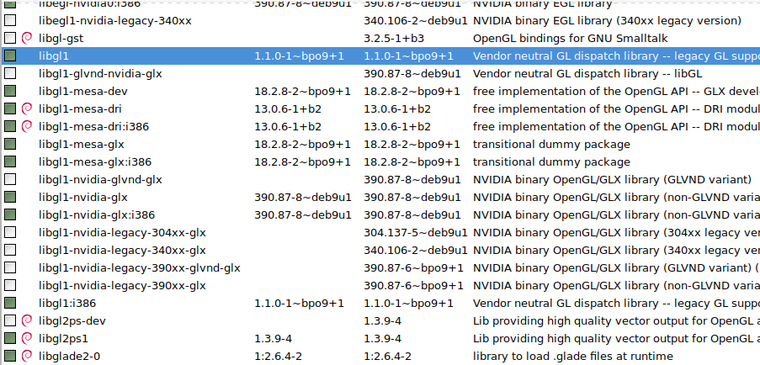
-
@Ivan
Unfortunately, I do not have a laptop with linux and an Nvidia Optimus GPU now.Do you have the
Nouveaudriver blacklisted or uninstalled? Because it causes some issues on Nvidia Optimus GPUs.
Does optimus/bumblebee work for you in other apps? What happens if you, for example, execute in the terminal:optirun glxgearsDoes
primusrunwork for you?optirunrelies onVirtualGLwhich might cause the issue you have.Dmitriy,
The SAMSON Team, https://s-c.io -
optirun glxgearsworks fine, I am intensively using VMD software with Nvidia.primusrunalso runs well.I add
--logconsoleflag in the start script.Can this information help?
dia@lenovo:~/NANO-D/SAMSON/0.7.0/Binaries$ ./SAMSON-Core.sh saving context launching SAMSON-Core Python found in the system: Python executable: /usr/bin/python3 qt.network.ssl: QSslSocket: cannot resolve CRYPTO_num_locks qt.network.ssl: QSslSocket: cannot resolve CRYPTO_set_id_callback qt.network.ssl: QSslSocket: cannot resolve CRYPTO_set_locking_callback qt.network.ssl: QSslSocket: cannot resolve ERR_free_strings qt.network.ssl: QSslSocket: cannot resolve EVP_CIPHER_CTX_cleanup qt.network.ssl: QSslSocket: cannot resolve EVP_CIPHER_CTX_init qt.network.ssl: QSslSocket: cannot resolve sk_new_null qt.network.ssl: QSslSocket: cannot resolve sk_push qt.network.ssl: QSslSocket: cannot resolve sk_free qt.network.ssl: QSslSocket: cannot resolve sk_num qt.network.ssl: QSslSocket: cannot resolve sk_pop_free qt.network.ssl: QSslSocket: cannot resolve sk_value qt.network.ssl: QSslSocket: cannot resolve SSL_library_init qt.network.ssl: QSslSocket: cannot resolve SSL_load_error_strings qt.network.ssl: QSslSocket: cannot resolve SSL_get_ex_new_index qt.network.ssl: QSslSocket: cannot resolve SSLv3_client_method qt.network.ssl: QSslSocket: cannot resolve SSLv23_client_method qt.network.ssl: QSslSocket: cannot resolve SSLv3_server_method qt.network.ssl: QSslSocket: cannot resolve SSLv23_server_method qt.network.ssl: QSslSocket: cannot resolve X509_STORE_CTX_get_chain qt.network.ssl: QSslSocket: cannot resolve OPENSSL_add_all_algorithms_noconf qt.network.ssl: QSslSocket: cannot resolve OPENSSL_add_all_algorithms_conf qt.network.ssl: QSslSocket: cannot resolve SSLeay qt.network.ssl: QSslSocket: cannot resolve SSLeay_version qt.network.ssl: QSslSocket: cannot call unresolved function SSLeay qt.network.ssl: Incompatible version of OpenSSL libpng warning: iCCP: known incorrect sRGB profile =============== SBGPath summary infos ================ =============== > SBGPath::getSAMSONPath() = /home/dia/NANO-D/SAMSON/0.7.0 > SBGPath::getSDKPath() = . =============== > SBGPath::getUserDataPath() = /home/dia/NANO-D/SAMSON > SBGPath::getUserElementPath() = /home/dia/.NANO-D/SAMSON/DATA/0.7.0/Elements > SBGPath::getUserElementDataPath() = /home/dia/.NANO-D/SAMSON/DATA/0.7.0/Data/Elements > SBGPath::getUserDownloadedElementPath() = /home/dia/.NANO-D/SAMSON/DATA/0.7.0/Download/Elements =============== > SBGPath::getDevelopperDataPath() = > SBGPath::getDevelopperElementPath() = /Elements > SBGPath::getDevelopperElementPackagedPath() = /Connect/Elements =============== > SBGPath::getBinaryPath() = /home/dia/NANO-D/SAMSON/0.7.0/Binaries =============== > SBGPath::getCurrentSkinPath() = /home/dia/.NANO-D/SAMSON/DATA/0.7.0/Resource/Skins/Default > SBGPath::getCursorPath() = /home/dia/.NANO-D/SAMSON/DATA/0.7.0/Resource/Skins/Default/Cursors > SBGPath::getIconPath() = /home/dia/.NANO-D/SAMSON/DATA/0.7.0/Resource/Skins/Default/Icons > SBGPath::getImagePath() = /home/dia/.NANO-D/SAMSON/DATA/0.7.0/Resource/Skins/Default/Images > SBGPath::getSoundPath() = /home/dia/.NANO-D/SAMSON/DATA/0.7.0/Resource/Skins/Default/Sounds > SBGPath::getSplashScreenPath() = /home/dia/.NANO-D/SAMSON/DATA/0.7.0/Resource/Skins/Default/SplashScreens > SBGPath::getStylePath() = /home/dia/.NANO-D/SAMSON/DATA/0.7.0/Resource/Skins/Default/StyleSheets =============== > SBGPath::getInterfacePath() = /home/dia/.NANO-D/SAMSON/DATA/0.7.0/Resource/Interface > SBGPath::getScratchPath() = /home/dia/.NANO-D/SAMSON/DATA/0.7.0/Scratch > SBGPath::getScratchElementPath() = /home/dia/.NANO-D/SAMSON/DATA/0.7.0/Scratch/Elements > SBGPath::getScratchUpdatesPath() = /home/dia/.NANO-D/SAMSON/DATA/0.7.0/Scratch/Updates > SBGPath::getShaderPath() = /home/dia/.NANO-D/SAMSON/DATA/0.7.0/Resource/Shaders > SBGPath::getTranslationPath() = /home/dia/.NANO-D/SAMSON/DATA/0.7.0/Resource/Translations =============== SBGPath summary infos ================ "/home/dia/.NANO-D/SAMSON/DATA/0.7.0/Resource/Skins/Default/Cursors" "/home/dia/.NANO-D/SAMSON/DATA/0.7.0/Resource/Skins/Default/Icons" "/home/dia/.NANO-D/SAMSON/DATA/0.7.0/Elements" "/home/dia/.NANO-D/SAMSON/DATA/0.7.0/Scratch" "/home/dia/.NANO-D/SAMSON/DATA/0.7.0/Resource/Shaders" "/home/dia/.NANO-D/SAMSON/DATA/0.7.0/Resource/Skins/Default/Sounds" "/home/dia/.NANO-D/SAMSON/DATA/0.7.0/Resource/Skins/Default/SplashScreens" "/home/dia/.NANO-D/SAMSON/DATA/0.7.0/Resource/Skins/Default/StyleSheets" "/home/dia/.NANO-D/SAMSON/DATA/0.7.0/Resource/Translations" ============================================================================= Allowed elements ids in database: 1 -> "06485695-DEE2-1383-A575-E5AABA05DCCD" 2 -> "154ACCDA-8950-C6B2-7456-DAB6BA82AA5D" 3 -> "2305E415-C812-1C1A-CDBE-78896176B067" 4 -> "385FE362-ADFD-CE55-95C0-4E63560EFA29" 5 -> "8B38B2FD-DE8D-F24A-36E7-7AC624173F9F" 6 -> "8CBDC8B1-59E1-6459-D68F-B840275DD5E9" 7 -> "9DFF7162-FFBF-C149-C9D3-2E1DEBC40321" 8 -> "CE375B52-7D0B-7DF0-AA3E-EB0AD85BEBFE" 9 -> "CEBACCDA-8950-C6B2-7456-D077BA82AA5D" 10 -> "EC83FAEB-1A42-FF16-EEB2-CF021EF38EBF" 11 -> "F912F119-7CBB-B5BD-972A-0A02DFCF683D" ============================================================================= "start 0 0 files downloaded successfully\n" Could not open "/home/dia/.NANO-D/SAMSON/DATA/0.7.0/Scratch/disabledElements.info" Extracting /home/dia/.NANO-D/SAMSON/DATA/0.7.0/Scratch/Elements/06485695-DEE2-1383-A575-E5AABA05DCCD Extracting /home/dia/.NANO-D/SAMSON/DATA/0.7.0/Scratch/Elements/154ACCDA-8950-C6B2-7456-DAB6BA82AA5D Extracting /home/dia/.NANO-D/SAMSON/DATA/0.7.0/Scratch/Elements/2305E415-C812-1C1A-CDBE-78896176B067 Extracting /home/dia/.NANO-D/SAMSON/DATA/0.7.0/Scratch/Elements/385FE362-ADFD-CE55-95C0-4E63560EFA29 Extracting /home/dia/.NANO-D/SAMSON/DATA/0.7.0/Scratch/Elements/8B38B2FD-DE8D-F24A-36E7-7AC624173F9F Extracting /home/dia/.NANO-D/SAMSON/DATA/0.7.0/Scratch/Elements/8CBDC8B1-59E1-6459-D68F-B840275DD5E9 Extracting /home/dia/.NANO-D/SAMSON/DATA/0.7.0/Scratch/Elements/9DFF7162-FFBF-C149-C9D3-2E1DEBC40321 Extracting /home/dia/.NANO-D/SAMSON/DATA/0.7.0/Scratch/Elements/CE375B52-7D0B-7DF0-AA3E-EB0AD85BEBFE Extracting /home/dia/.NANO-D/SAMSON/DATA/0.7.0/Scratch/Elements/CEBACCDA-8950-C6B2-7456-D077BA82AA5D Extracting /home/dia/.NANO-D/SAMSON/DATA/0.7.0/Scratch/Elements/EC83FAEB-1A42-FF16-EEB2-CF021EF38EBF Extracting /home/dia/.NANO-D/SAMSON/DATA/0.7.0/Scratch/Elements/F912F119-7CBB-B5BD-972A-0A02DFCF683D Registering: A visual model to represent secondary structure Registering: Secondary structure Registering: This element contains three exporters (*xyz, *.pdb, *.mol2) to easily export models from SAMSON Registering: Protein Data Bank (*.pdb) Registering: XYZ (*.xyz) Registering: Mol2 (*.mol2) Registering: An editor to generate atoms from the periodic table Registering: Periodic table Registering: An editor to easily twist molecular systems Registering: Twister Registering: This element contains a set of essential editors for SAMSON, for example to select, translate, erase, rotate... Registering: Translation controller plane Registering: Torsion Registering: Ruler Registering: Delegate Registering: Translation controller center GUI Registering: Rotation controller axis Registering: Translation controller plane GUI Registering: Rotation controller axis GUI Registering: Angle Registering: Atom-atom distance Registering: Atom name Registering: Translation controller axis Registering: Translation controller center Registering: Translation Registering: Eraser Registering: Rotation controller Registering: Translation controller axis GUI Registering: Bond order Registering: Group name Registering: Translation controller Registering: Move camera Registering: Atom creator Registering: Rotation controller track-ball GUI Registering: Bond length Registering: Rotation controller track-ball Registering: Rectangle selection Registering: Lasso selection Registering: Point selection Registering: Rotation Registering: This element is a group called default visual models to easily display different molecule visualizations in SAMSON Registering: Gaussian surface Registering: Ball and stick Registering: Ball-and-stick Registering: Van der Waals Registering: Lines Registering: Licorice Registering: Lines Registering: Van der Waals Registering: Gaussian surface Registering: Licorice Registering: SAMSON document exporters (*.sam and *.samx) Registering: SAMSON Documents (*.samx) Registering: SAMSON Documents (*.sam) Registering: This element contains three importers (*xyz, *.mol2, *.pdb [with aliases: *.pdb1, ..., *.pdb6, *.ent, *.vdb]) to easily load models into SAMSON Registering: Protein Data Bank (*.pdb4) Registering: Protein Data Bank (*.ent) Registering: Protein Data Bank (*.pdb5) Registering: VIPERdb, PDB format (*.vdb) Registering: Protein Data Bank (*.pdb6) Registering: XYZ (*.xyz) Registering: Protein Data Bank (*.pdb) Registering: Mol2 (*.mol2) Registering: Protein Data Bank (*.pdb1) Registering: Protein Data Bank (*.pdb2) Registering: Protein Data Bank (*.pdb3) Registering: SAMSON document importers (*.sam and *.samx) Registering: SAMSON Documents (*.samx) Registering: SAMSON Documents (*.sam) Registering: Universal Force Field Registering: Universal Force Field Registering: Universal Force Field Registering: UFF Force Field Factory Registering: An element containing six state updaters Registering: SESStateUpdaterPack Registering: SESStateUpdaterPack Registering: Partitioned Euler Registering: SESStateUpdaterPack Registering: Velocity Verlet Registering: SESStateUpdaterPack Registering: Adaptively restrained NVE Registering: Steepest descent Registering: SESStateUpdaterPack Registering: SESStateUpdaterPack Registering: Interactive modeling Registering: Adaptive steepest descent Registering: SAMSON Base - Data Model - App Registering: App Registering: SAMSON Base - Data Model - Color Registering: Color scheme per chain ID Registering: Constant color scheme Registering: Color scheme per temperature factor Registering: CPK color scheme Registering: Color scheme per residue sequence number Registering: Color scheme per residue type Registering: Color scheme per partial charge Registering: Color scheme per secondary structure type Registering: Color scheme per occupancy Registering: Color scheme per formal charge Registering: SAMSON Base - Data Model - Data Graph Registering: Data graph node Registering: Node group Registering: Data graph node color scheme Registering: SAMSON Base - Data Model - Document Registering: Label Registering: Camera Registering: Layer Registering: Document Registering: SAMSON Base - Data Model - Structural Model Registering: Molecule Registering: Backbone Registering: Atom Registering: Segment Registering: Bond Registering: Side chain Registering: Path Registering: Chain Registering: Structural model Registering: Grid Registering: Structural particle Registering: Residue Registering: Structural nodes Registering: Conformation Registering: Pseudo-atom Registering: Structural group Registering: SAMSON Base - Data Model - Visual Model Registering: SAMSON Base - Data Model - Controller Registering: Controller Registering: Controller node Registering: SAMSON Base - GUI - DataGraph Registering: SAMSON Base - GUI - Document Registering: The GUI of a camera Registering: The GUI of a layer Registering: SAMSON Base - GUI - Editor Registering: Editor Registering: SAMSON Base - GUI - Inspector Registering: Inspector - SBQuantity::mass Factory Registering: Inspector - SBQuantity::length Factory Registering: Inspector - Bool Factory Registering: Inspector - Node Factory Registering: Inspector - SBBond::BondType Factory Registering: Inspector - SBQuantity::dimensionless Factory Registering: Inspector - int Factory Registering: Inspector - SBNode::Type Factory Registering: Inspector - double Factory Registering: Inspector - SBResidue::ResidueType Factory Registering: Inspector - std::string Factory Registering: Inspector - float Factory Registering: Inspector - SBQuantity::second Factory Registering: Inspector - unsigned short Factory Registering: Inspector - SBPosition3 Factory Registering: Inspector - short Factory Registering: Inspector - char Factory Registering: Inspector - SBVector3 Factory Registering: Inspector - SBQuantity::dimensionless Factory Registering: Inspector - unsigned int Factory Registering: Inspector - Atom Factory Registering: Inspector - SBResidue::SecondaryStructureType Factory Registering: Inspector - SBPath::AnimationType Factory Registering: Inspector - SBElement::Type Factory Registering: Inspector - SBQuantity::time Factory Registering: Inspector - char Factory Registering: SAMSON Base - GUI - Structural model Registering: The GUI of an atom Registering: The GUI of a structural model Registering: The GUI of a structural model conformation Registering: The GUI of a bond Registering: The GUI of a structural model conformation Registering: SAMSON Base - Facade - SAMSON Registering: The SAMSON Facade libpng warning: iCCP: known incorrect sRGB profile libpng warning: iCCP: known incorrect sRGB profile libpng warning: iCCP: known incorrect sRGB profile libpng warning: iCCP: known incorrect sRGB profile libpng warning: iCCP: known incorrect sRGB profile libpng warning: iCCP: known incorrect sRGB profile libpng warning: iCCP: known incorrect sRGB profile libpng warning: iCCP: known incorrect sRGB profile ============================================================================= Allowed elements in database: ----------------------------------------------------------------------- - "elementName" "Secondary structure on GPUs" - "elementDeveloperID" "C682B30F-0D21-4CDB-B968-B72E225DDC8F" - "elementID" "06485695-DEE2-1383-A575-E5AABA05DCCD" - "elementVersion" "0.7.0" - "checksumDebug" 0 - "checksumRelease" 0 - "elementDescription" "" - "elementOS" "" - "samsonVersion" "0.7.0" - "forceUpdate" false ----------------------------------------------------------------------- ----------------------------------------------------------------------- - "elementName" "SAMSON Visual Models" - "elementDeveloperID" "C682B30F-0D21-4CDB-B968-B72E225DDC8F" - "elementID" "154ACCDA-8950-C6B2-7456-DAB6BA82AA5D" - "elementVersion" "0.7.0" - "checksumDebug" 0 - "checksumRelease" 0 - "elementDescription" "" - "elementOS" "" - "samsonVersion" "0.7.0" - "forceUpdate" false ----------------------------------------------------------------------- ----------------------------------------------------------------------- - "elementName" "Periodic table" - "elementDeveloperID" "C682B30F-0D21-4CDB-B968-B72E225DDC8F" - "elementID" "2305E415-C812-1C1A-CDBE-78896176B067" - "elementVersion" "0.7.0" - "checksumDebug" 0 - "checksumRelease" 0 - "elementDescription" "" - "elementOS" "" - "samsonVersion" "0.7.0" - "forceUpdate" false ----------------------------------------------------------------------- ----------------------------------------------------------------------- - "elementName" "Basic importers" - "elementDeveloperID" "C682B30F-0D21-4CDB-B968-B72E225DDC8F" - "elementID" "385FE362-ADFD-CE55-95C0-4E63560EFA29" - "elementVersion" "0.7.7" - "checksumDebug" 0 - "checksumRelease" 0 - "elementDescription" "" - "elementOS" "" - "samsonVersion" "0.7.0" - "forceUpdate" false ----------------------------------------------------------------------- ----------------------------------------------------------------------- - "elementName" "Twister" - "elementDeveloperID" "C682B30F-0D21-4CDB-B968-B72E225DDC8F" - "elementID" "8B38B2FD-DE8D-F24A-36E7-7AC624173F9F" - "elementVersion" "0.7.0" - "checksumDebug" 0 - "checksumRelease" 0 - "elementDescription" "" - "elementOS" "" - "samsonVersion" "0.7.0" - "forceUpdate" false ----------------------------------------------------------------------- ----------------------------------------------------------------------- - "elementName" "Universal force field" - "elementDeveloperID" "C682B30F-0D21-4CDB-B968-B72E225DDC8F" - "elementID" "8CBDC8B1-59E1-6459-D68F-B840275DD5E9" - "elementVersion" "0.7.5" - "checksumDebug" 0 - "checksumRelease" 0 - "elementDescription" "" - "elementOS" "" - "samsonVersion" "0.7.0" - "forceUpdate" false ----------------------------------------------------------------------- ----------------------------------------------------------------------- - "elementName" "SAMSON Format Exporter" - "elementDeveloperID" "C682B30F-0D21-4CDB-B968-B72E225DDC8F" - "elementID" "9DFF7162-FFBF-C149-C9D3-2E1DEBC40321" - "elementVersion" "0.7.0" - "checksumDebug" 0 - "checksumRelease" 0 - "elementDescription" "" - "elementOS" "" - "samsonVersion" "0.7.0" - "forceUpdate" false ----------------------------------------------------------------------- ----------------------------------------------------------------------- - "elementName" "SAMSON Format importers" - "elementDeveloperID" "C682B30F-0D21-4CDB-B968-B72E225DDC8F" - "elementID" "CE375B52-7D0B-7DF0-AA3E-EB0AD85BEBFE" - "elementVersion" "0.7.0" - "checksumDebug" 0 - "checksumRelease" 0 - "elementDescription" "" - "elementOS" "" - "samsonVersion" "0.7.0" - "forceUpdate" false ----------------------------------------------------------------------- ----------------------------------------------------------------------- - "elementName" "SAMSON Editors" - "elementDeveloperID" "C682B30F-0D21-4CDB-B968-B72E225DDC8F" - "elementID" "CEBACCDA-8950-C6B2-7456-D077BA82AA5D" - "elementVersion" "0.7.3" - "checksumDebug" 0 - "checksumRelease" 0 - "elementDescription" "" - "elementOS" "" - "samsonVersion" "0.7.0" - "forceUpdate" false ----------------------------------------------------------------------- ----------------------------------------------------------------------- - "elementName" "Basic exporters" - "elementDeveloperID" "C682B30F-0D21-4CDB-B968-B72E225DDC8F" - "elementID" "EC83FAEB-1A42-FF16-EEB2-CF021EF38EBF" - "elementVersion" "0.7.0" - "checksumDebug" 0 - "checksumRelease" 0 - "elementDescription" "" - "elementOS" "" - "samsonVersion" "0.7.0" - "forceUpdate" false ----------------------------------------------------------------------- ----------------------------------------------------------------------- - "elementName" "State Updater Pack" - "elementDeveloperID" "C682B30F-0D21-4CDB-B968-B72E225DDC8F" - "elementID" "F912F119-7CBB-B5BD-972A-0A02DFCF683D" - "elementVersion" "0.7.0" - "checksumDebug" 0 - "checksumRelease" 0 - "elementDescription" "" - "elementOS" "" - "samsonVersion" "0.7.0" - "forceUpdate" false ----------------------------------------------------------------------- ============================================================================= QPixmap::scaled: Pixmap is a null pixmap libpng warning: iCCP: known incorrect sRGB profile libpng warning: iCCP: known incorrect sRGB profile "File" "File" "Edit" "Edit" "App" -
-
Actually, you should not worry about the following libpng warning:
libpng warning: iCCP: known incorrect sRGB profileThe
libpngwarning might be caused bylibpngprovided with your Python installation. To check whether this causes the problem, you could try commenting the addition of a path to Python libraries in theSAMSON-Core.shscript:#export LD_LIBRARY_PATH=${PYTHON_LIBRARY_PATH}:${LD_LIBRARY_PATH}I do not think that it is due to
libpng, rather it might be a problem of a driver and OpenGL layer provided by Bumblebee. -
It is really strange, that even if I tried to run it with
optirunorprimusrunin about dialog it showing, that I still using Intel HD card.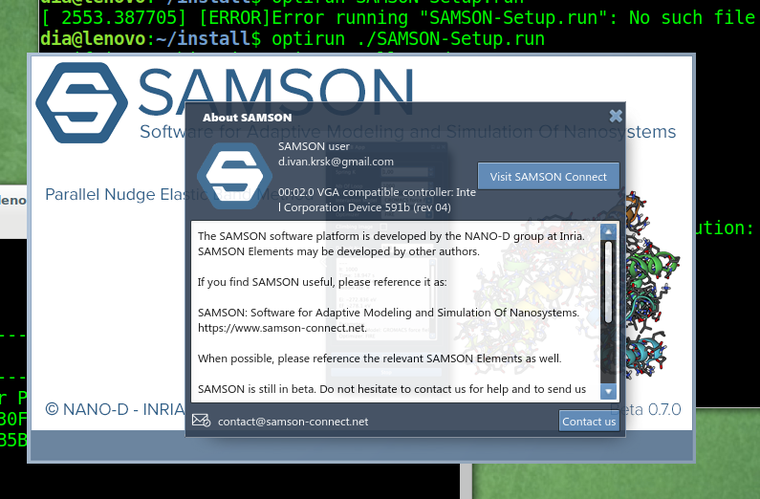
I think there is some hidden restart of application GUI inside some python stuff, so really it does not use Nvidia card at all.
-
@Ivan
Unfortunately, I do not have a laptop with linux and an Nvidia Optimus GPU now.Do you have the
Nouveaudriver blacklisted or uninstalled? Because it causes some issues on Nvidia Optimus GPUs.
Does optimus/bumblebee work for you in other apps? What happens if you, for example, execute in the terminal:optirun glxgearsDoes
primusrunwork for you?optirunrelies onVirtualGLwhich might cause the issue you have.Do you have the
Nouveaudriver blacklisted or uninstalled? Because it causes some issues on Nvidia Optimus GPUs.Yes.
dia@lenovo:~$ cat /etc/modprobe.d/nvidia-blacklists-nouveau.conf # You need to run "update-initramfs -u" after editing this file. # see #580894 blacklist nouveau -
Python is not used by SAMSON, Python is present in the launching script just to add a path to its libraries so that users could use the Python Scripting Element. So you can safely comment the Python-related block in the launching script if you are not using the Python Scripting Element.
The information you see in the About dialogue (or in Preferences > Installation > General) shows all the graphics cards, meaning that it can show both CPU and GPU. But in your case, the SAMSON installer could not find your Nvidia GPU.
Personally, I used SAMSON before on a laptop with Linux (Ubuntu) equipped with Nvidia GeForge GTX 670MX GPU (which has Optimus technology) but without Bumblebee/optirun installed. So the problem seems to be either in SAMSON not being able to properly detect GPU or lack of some drivers.
How did you install SAMSON? With optirun or without? Does it give you the same behavior in both cases?
-
Have you tried to install SAMSON with
primusrunand then launching SAMSON with it?If there is a configuration file for optirun/primusrun which allows specifying which apps should use GPU you may try specifying GPU for SAMSON.
Is it possible for you to try with
nvidia-prime? It should provide better OpenGL support compared tooptirunsinceoptirunhas an additional layerVirtualGLwhich might be causing this issue.Dmitriy,
The SAMSON Team, https://s-c.io -
Have you tried to install SAMSON with
primusrunand then launching SAMSON with it?If there is a configuration file for optirun/primusrun which allows specifying which apps should use GPU you may try specifying GPU for SAMSON.
Is it possible for you to try with
nvidia-prime? It should provide better OpenGL support compared tooptirunsinceoptirunhas an additional layerVirtualGLwhich might be causing this issue.@dmitriymarin said in SAMSON with hybrid graphics cards (Intel/Nvidia):
Have you tried to install SAMSON with
primusrunand then launching SAMSON with it?I tried, and that did not help.
If there is a configuration file for optirun/primusrun which allows specifying which apps should use GPU you may try specifying GPU for SAMSON.
There is no such a file :( It is controlled by the prefix in the command line when I calling the app.
Is it possible for you to try with
nvidia-prime? It should provide better OpenGL support compared tooptirunsinceoptirunhas an additional layerVirtualGLwhich might be causing this issue.I have no such a command
nvidia-prime... If I understand correct,primusrunhave no such an extra layer. -
@dmitriymarin said in SAMSON with hybrid graphics cards (Intel/Nvidia):
Have you tried to install SAMSON with
primusrunand then launching SAMSON with it?I tried, and that did not help.
If there is a configuration file for optirun/primusrun which allows specifying which apps should use GPU you may try specifying GPU for SAMSON.
There is no such a file :( It is controlled by the prefix in the command line when I calling the app.
Is it possible for you to try with
nvidia-prime? It should provide better OpenGL support compared tooptirunsinceoptirunhas an additional layerVirtualGLwhich might be causing this issue.I have no such a command
nvidia-prime... If I understand correct,primusrunhave no such an extra layer.@ivan said in SAMSON with hybrid graphics cards (Intel/Nvidia):
I tried, and that did not help.
Apparently, SAMSON might be having a problem properly detecting your GPU during the installation, even with
primusrun.Nvidia PRIME does not go with Bumblebee/optirun/primusrun, it is an Nvidia technology and it also allows one to switch between CPU and Nvidia GPU without additional layers giving a direct OpenGL access, which is more preferable. It is done via GPU offloading. But it comes with a downside: for a switch between CPU and GPU to take an effect one needs to log out and log in back (OS needs to do some re-initializations).
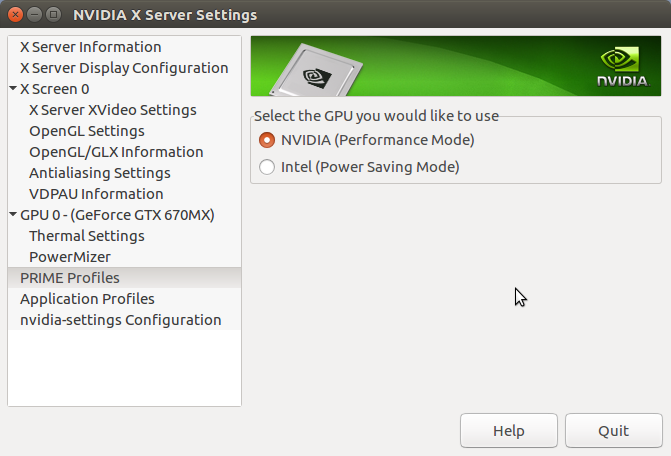
You can check whether you have Nvidia PRIME or not in the Nvidia X Server Settings. Nvidia PRIME is either installed together with an nvidia proprietary driver or you can install it via (after installing nvidia proprietary drivers):sudo apt install nvidia-primeNote: To use Nvidia PRIME you might need to remove Bumblebee/optirun/primusrun.
Note: In case, if you are using Nvidia PRIME, SAMSON should be installed with an active Nvidia GPU and to use SAMSON it would be necessary to enable to Nvidia GPU.
Personally, on my laptop with Ubuntu 16.04 and equipped with Nvidia GeForce GTX 670MX I have the
nvidia-384driver installed with Nvidia PRIME. I had Bumblebee installed many years ago, but I could not make it work with CUDA.
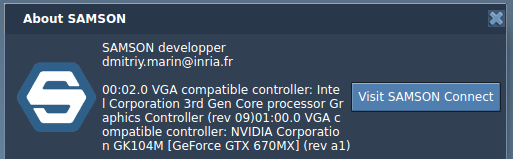
-
-
-
I installed Linux Mint 19.1 and installed nvidia-driver-390. Now interface has no such troubles. Thank you for advices.
@Ivan
Great! I am glad that you solved the issue! Apparently, it was a problem with drivers. Do you use primusrun/optirun or just nvidia GPU directly?Dmitriy,
The SAMSON Team, https://s-c.io -
@ivan
Yes, sorry, it can consume quite a lot sometimes. For me, for example, just the interface consumes sometimes 30-50% of one CPU core. To decrease the CPU consumption, you can hide the Document view (Ctrl/Cmd+1) or the Inspector (Ctrl/Cmd+I) when you do not need them. There is an issue with them which causes such consumption. It will be fixed in the next version of SAMSON.Dmitriy,
The SAMSON Team, https://s-c.io -
@Ivan
Great! I am glad that you solved the issue! Apparently, it was a problem with drivers. Do you use primusrun/optirun or just nvidia GPU directly?@dmitriymarin Now I am using Nvidia PRIME like you showed in screenshot above. I do not think, that it is driver issue, but it is how you utilize them. I am also developing some software with OpenGL, however by using lower version API (1.2). So it works both Intel and Nvidia cards. I think, that advanced functions like in OpenGL 3.2 should be used using procedure addresses like it is doing with SDL_GL_GetProcAddress.
-
@ivan
Yes, sorry, it can consume quite a lot sometimes. For me, for example, just the interface consumes sometimes 30-50% of one CPU core. To decrease the CPU consumption, you can hide the Document view (Ctrl/Cmd+1) or the Inspector (Ctrl/Cmd+I) when you do not need them. There is an issue with them which causes such consumption. It will be fixed in the next version of SAMSON.@dmitriymarin said in SAMSON with hybrid graphics cards (Intel/Nvidia):
@ivan
Yes, sorry, it can consume quite a lot sometimes. For me, for example, just the interface consumes sometimes 30-50% of one CPU core. To decrease the CPU consumption, you can hide the Document view (Ctrl/Cmd+1) or the Inspector (Ctrl/Cmd+I) when you do not need them. There is an issue with them which causes such consumption. It will be fixed in the next version of SAMSON.Will wait :) SAMSON has very cute interface, however such cost of one core for that it is not acceptable!
-
Dear @Ivan ,
Thanks to issues raised on the forum, we have fixed the issue in SAMSON causing problems with the viewport when using Intel integrated graphics processor. This issue might have been causing the problem you have posted in this thread. The new installation of SAMSON should resolve the issue.


Hello! It looks like you're interested in this conversation, but you don't have an account yet.
Getting fed up of having to scroll through the same posts each visit? When you register for an account, you'll always come back to exactly where you were before, and choose to be notified of new replies (either via email, or push notification). You'll also be able to save bookmarks and upvote posts to show your appreciation to other community members.
With your input, this post could be even better 💗
Register Login