
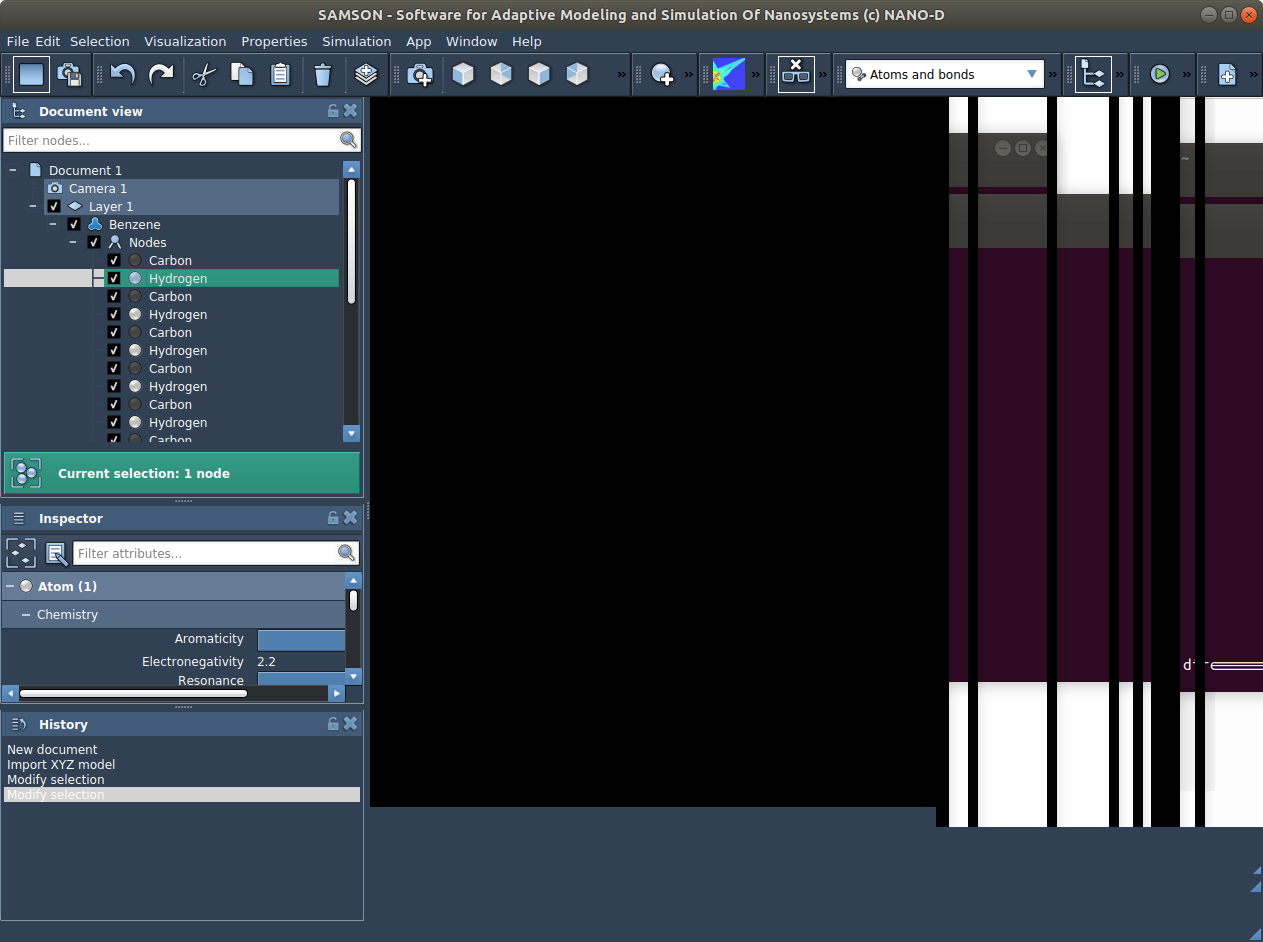
Problem of graphics card after SAMSON installation on Ubuntu 18.04 (Intel processors)
-
Thank you, @Robert
Could you, please, try these commands and see if it shows you anything:
ldd /usr/lib/x86_64-linux-gnu/libOpenGL.so

cd ~/NANO-D/SAMSON/0.7.0/Binaries
ldd ./SAMSON-Core | grep "not found" | grep -v "Qt5"
ldd ./libSBGRender.so | grep "not found" | grep -v "Qt5"
Here we check for dependencies which are not found excluding Qt5 because Qt5 might be included in the script launching SAMSON-Core.
If you see any output, please, post it here. -
Thanks Dmitriy.
"ldd /usr/lib/x86_64-linux-gnu/libOpenGL.so" gives me :
linux-vdso.so.1 (0x00007ffc4cd2b000)
libGLdispatch.so.0 => /usr/lib/x86_64-linux-gnu/libGLdispatch.so.0 (0x00007fda5d9e0000)
libc.so.6 => /lib/x86_64-linux-gnu/libc.so.6 (0x00007fda5d5ef000)
libdl.so.2 => /lib/x86_64-linux-gnu/libdl.so.2 (0x00007fda5d3eb000)
/lib64/ld-linux-x86-64.so.2 (0x00007fda5dec4000)ldd ./SAMSON-Core | grep "not found" | grep -v "Qt5" gives me :
libSAMSON.so => not found
libSBGCommand.so => not found
libGUI.so => not found
libSBGUser.so => not found
libSBSNeighborSearch.so => not found
libSBGMain.so => not found
libSBGProperty.so => not found
libSBGToolBar.so => not found
libSBGElement.so => not found
libSBGInspector.so => not found
libSBIFile.so => not found
libSBGRender.so => not found
libSBGDocument.so => not found
libSBGUndo.so => not found
libSBGWidget.so => not found
libSBIElement.so => not found
libSBGNotification.so => not found
libSBGLog.so => not found
libIO.so => not found
libSBIPackage.so => not found
libSBIWebService.so => not found
libSBGVisualModel.so => not found
libSBGStructuralModel.so => not found
libSBGPropertyModel.so => not found
libSBGInteractionModel.so => not found
libSBGDynamicalModel.so => not found
libSBGSimulator.so => not found
libSBGStateUpdater.so => not found
libSBGDataGraph.so => not found
libSBGMenu.so => not found
libSBGAction.so => not found
libSBGApp.so => not found
libSBGEditor.so => not found
libSBGWindow.so => not found
libSBGSettings.so => not found
libData.so => not found
libSBDColor.so => not found
libSBDDocument.so => not found
libSBMVisualModel.so => not found
libSBDController.so => not found
libSBMPropertyModel.so => not found
libSBSSimulator.so => not found
libSBDApp.so => not found
libSBGPath.so => not found
libSBSStateUpdater.so => not found
libSBMInteractionModel.so => not found
libSBMDynamicalModel.so => not found
libSBMStructuralModel.so => not found
libSBDType.so => not found
libSBMElement.so => not found
libSBDQuantity.so => not found
libSBMModel.so => not found
libSBDDataGraph.so => not found
libSBCFunctor.so => not found
libCore.so => not found
libSBCKernel.so => not found
libSBCUndo.so => not found
libSBCClass.so => not found
libSBCSignal.so => not found
libSBCReference.so => not found
libSBCLog.so => not found
libSBCMeta.so => not found
libSBCContainer.so => not found
libSBCHeap.so => not found
libSBCSerializer.so => not foundFinally, the command
ldd ./libSBGRender.so | grep "not found" | grep -v "Qt5"
gives me :libSBGDocument.so => not found
libSBGStructuralModel.so => not found
libSBGDynamicalModel.so => not found
libSBGVisualModel.so => not found
libSBGInteractionModel.so => not found
libSBGPropertyModel.so => not found
libSBGSimulator.so => not found
libSBGStateUpdater.so => not found
libSBGWidget.so => not found
libSBGDataGraph.so => not found
libSBGMenu.so => not found
libSBGAction.so => not found
libSBGEditor.so => not found
libSBGApp.so => not found
libSBGLog.so => not found
libIO.so => not found
libSBIPackage.so => not found
libSBIElement.so => not found
libSBIWebService.so => not found
libSBGNotification.so => not found
libSBGUndo.so => not found
libData.so => not found
libSBDApp.so => not found
libSBGWindow.so => not found
libSBDColor.so => not found
libSBDDocument.so => not found
libSBMVisualModel.so => not found
libSBMPropertyModel.so => not found
libSBSSimulator.so => not found
libSBSStateUpdater.so => not found
libSBMInteractionModel.so => not found
libSBMDynamicalModel.so => not found
libSBMStructuralModel.so => not found
libSBMModel.so => not found
libSBMElement.so => not found
libSBDQuantity.so => not found
libSBDController.so => not found
libSBDDataGraph.so => not found
libCore.so => not found
libSBCKernel.so => not found
libSBCFunctor.so => not found
libSBCUndo.so => not found
libSBCClass.so => not found
libSBCSignal.so => not found
libSBCReference.so => not found
libSBCLog.so => not found
libSBCSerializer.so => not found
libSBGSettings.so => not found
libSBGPath.so => not found
libSBDType.so => not found
libSBCMeta.so => not found
libSBCContainer.so => not found
libSBCHeap.so => not foundIt does not seem encouraging as nothing is found ... !
Regards,
Robert -
Sorry, I should have added:
cd ~/NANO-D/SAMSON/0.7.0/Binaries
export LD_LIBRARY_PATH=.:./SAMSONQtLibs:$LD_LIBRARY_PATH
So, all these "not found" you posted are ok, since these libraries are actually provided with SAMSON and are placed in the same folder.
If you redo thelddcheck it should not find any "not found" libraries.Or you can do this
lddcheck from theSAMSON-Core.shlaunching script after exporting all the libraries (already done in the script) instead of launching./SAMSON-CoreWe will see what might cause the issue, but might be it smth more general since you said the VMD does not work as well.
-
No problem. Indeed, I don't find any "not found" library anymore with the two ldd checks above :
ldd ./SAMSON-Core | grep "not found" | grep -v "Qt5"
ldd ./libSBGRender.so | grep "not found" | grep -v "Qt5"When I launch SAMSON (./SAMSON-Core.sh or ./SAMSON-Core), I get the following message in the terminal :
"
saving context
launching SAMSON-Core
Python found in the system:
Python executable: /home/rbenda/anaconda3/bin/python3
Python library has not been loaded: Cannot load library libpython3.6m: (libpython3.6m: cannot open shared object file: No such file or directory)
"I don't know if the problem can be due to this Python library but I don't think so (there might be a problem for SAMSON Apps using Python but it is not yet my case ...).
I have modified the SAMSON-Core.sh script with vi. I uncommented the two lines
ldd SAMSON-Core
echo $LD_LIBRARY_PATHand added
ldd ./SAMSON-Core | grep "not found" | grep -v "Qt5"
ldd ./libSBGRender.so | grep "not found" | grep -v "Qt5"just before the last line echo "restoring context".
SAMSON windows opens (as usual, but with the usual problem of no molecule appearing when loading a molecule, or the window not following the 'mouse' movement as you could see in the first screen shot I posted). I obtain this message in the terminal :
saving context
launching SAMSON-Core
Python found in the system:
Python executable: /home/rbenda/anaconda3/bin/python3
linux-vdso.so.1 (0x00007ffed5fd5000)
libdl.so.2 => /lib/x86_64-linux-gnu/libdl.so.2 (0x00007fab6811d000)
libOpenGL.so.0 => /usr/lib/x86_64-linux-gnu/libOpenGL.so.0 (0x00007fab67eef000)
libGLX.so.0 => /usr/lib/x86_64-linux-gnu/libGLX.so.0 (0x00007fab67cbe000)
libGLU.so.1 => /usr/lib/x86_64-linux-gnu/libGLU.so.1 (0x00007fab67a4f000)
libSAMSON.so => /home/rbenda/NANO-D/SAMSON/0.7.0/Binaries/libSAMSON.so (0x00007fab67647000)
libSBGCommand.so => /home/rbenda/NANO-D/SAMSON/0.7.0/Binaries/libSBGCommand.so (0x00007fab6732e000)
libGUI.so => /home/rbenda/NANO-D/SAMSON/0.7.0/Binaries/libGUI.so (0x00007fab67000000)
libSBGUser.so => /home/rbenda/NANO-D/SAMSON/0.7.0/Binaries/libSBGUser.so (0x00007fab66de2000)
libSBSNeighborSearch.so => /home/rbenda/NANO-D/SAMSON/0.7.0/Binaries/libSBSNeighborSearch.so (0x00007fab66bba000)
libSBGMain.so => /home/rbenda/NANO-D/SAMSON/0.7.0/Binaries/libSBGMain.so (0x00007fab66912000)
libSBGProperty.so => /home/rbenda/NANO-D/SAMSON/0.7.0/Binaries/libSBGProperty.so (0x00007fab666ff000)
libSBGToolBar.so => /home/rbenda/NANO-D/SAMSON/0.7.0/Binaries/libSBGToolBar.so (0x00007fab664e3000)
libSBGElement.so => /home/rbenda/NANO-D/SAMSON/0.7.0/Binaries/libSBGElement.so (0x00007fab662ce000)
libSBGInspector.so => /home/rbenda/NANO-D/SAMSON/0.7.0/Binaries/libSBGInspector.so (0x00007fab65cfb000)
libSBIFile.so => /home/rbenda/NANO-D/SAMSON/0.7.0/Binaries/libSBIFile.so (0x00007fab65af0000)
libSBGRender.so => /home/rbenda/NANO-D/SAMSON/0.7.0/Binaries/libSBGRender.so (0x00007fab65830000)
libSBGDocument.so => /home/rbenda/NANO-D/SAMSON/0.7.0/Binaries/libSBGDocument.so (0x00007fab655ce000)
libSBGUndo.so => /home/rbenda/NANO-D/SAMSON/0.7.0/Binaries/libSBGUndo.so (0x00007fab653b9000)
libSBGWidget.so => /home/rbenda/NANO-D/SAMSON/0.7.0/Binaries/libSBGWidget.so (0x00007fab65162000)
libSBIElement.so => /home/rbenda/NANO-D/SAMSON/0.7.0/Binaries/libSBIElement.so (0x00007fab64f13000)
libSBGNotification.so => /home/rbenda/NANO-D/SAMSON/0.7.0/Binaries/libSBGNotification.so (0x00007fab64d06000)
libSBGLog.so => /home/rbenda/NANO-D/SAMSON/0.7.0/Binaries/libSBGLog.so (0x00007fab64af4000)
libIO.so => /home/rbenda/NANO-D/SAMSON/0.7.0/Binaries/libIO.so (0x00007fab648f1000)
libSBIPackage.so => /home/rbenda/NANO-D/SAMSON/0.7.0/Binaries/libSBIPackage.so (0x00007fab646d1000)
libSBIWebService.so => /home/rbenda/NANO-D/SAMSON/0.7.0/Binaries/libSBIWebService.so (0x00007fab644b3000)
libSBGVisualModel.so => /home/rbenda/NANO-D/SAMSON/0.7.0/Binaries/libSBGVisualModel.so (0x00007fab642a3000)
libSBGStructuralModel.so => /home/rbenda/NANO-D/SAMSON/0.7.0/Binaries/libSBGStructuralModel.so (0x00007fab64037000)
libSBGPropertyModel.so => /home/rbenda/NANO-D/SAMSON/0.7.0/Binaries/libSBGPropertyModel.so (0x00007fab63e27000)
libSBGInteractionModel.so => /home/rbenda/NANO-D/SAMSON/0.7.0/Binaries/libSBGInteractionModel.so (0x00007fab63c16000)
libSBGDynamicalModel.so => /home/rbenda/NANO-D/SAMSON/0.7.0/Binaries/libSBGDynamicalModel.so (0x00007fab63a05000)
libSBGSimulator.so => /home/rbenda/NANO-D/SAMSON/0.7.0/Binaries/libSBGSimulator.so (0x00007fab637f5000)
libSBGStateUpdater.so => /home/rbenda/NANO-D/SAMSON/0.7.0/Binaries/libSBGStateUpdater.so (0x00007fab635e8000)
libSBGDataGraph.so => /home/rbenda/NANO-D/SAMSON/0.7.0/Binaries/libSBGDataGraph.so (0x00007fab6331c000)
libSBGMenu.so => /home/rbenda/NANO-D/SAMSON/0.7.0/Binaries/libSBGMenu.so (0x00007fab6310e000)
libSBGAction.so => /home/rbenda/NANO-D/SAMSON/0.7.0/Binaries/libSBGAction.so (0x00007fab62ee8000)
libSBGApp.so => /home/rbenda/NANO-D/SAMSON/0.7.0/Binaries/libSBGApp.so (0x00007fab62cdd000)
libSBGEditor.so => /home/rbenda/NANO-D/SAMSON/0.7.0/Binaries/libSBGEditor.so (0x00007fab62ac0000)
libSBGWindow.so => /home/rbenda/NANO-D/SAMSON/0.7.0/Binaries/libSBGWindow.so (0x00007fab6286b000)
libSBGSettings.so => /home/rbenda/NANO-D/SAMSON/0.7.0/Binaries/libSBGSettings.so (0x00007fab62652000)
libData.so => /home/rbenda/NANO-D/SAMSON/0.7.0/Binaries/libData.so (0x00007fab61b9e000)
libSBDColor.so => /home/rbenda/NANO-D/SAMSON/0.7.0/Binaries/libSBDColor.so (0x00007fab61854000)
libSBDDocument.so => /home/rbenda/NANO-D/SAMSON/0.7.0/Binaries/libSBDDocument.so (0x00007fab6130b000)
libSBMVisualModel.so => /home/rbenda/NANO-D/SAMSON/0.7.0/Binaries/libSBMVisualModel.so (0x00007fab610fa000)
libSBDController.so => /home/rbenda/NANO-D/SAMSON/0.7.0/Binaries/libSBDController.so (0x00007fab60d80000)
libSBMPropertyModel.so => /home/rbenda/NANO-D/SAMSON/0.7.0/Binaries/libSBMPropertyModel.so (0x00007fab60b6f000)
libSBSSimulator.so => /home/rbenda/NANO-D/SAMSON/0.7.0/Binaries/libSBSSimulator.so (0x00007fab60957000)
libSBDApp.so => /home/rbenda/NANO-D/SAMSON/0.7.0/Binaries/libSBDApp.so (0x00007fab60743000)
libSBGPath.so => /home/rbenda/NANO-D/SAMSON/0.7.0/Binaries/libSBGPath.so (0x00007fab6052b000)
libQt5MultimediaWidgets.so.5 => ./SAMSONQtLibs/libQt5MultimediaWidgets.so.5 (0x00007fab6030d000)
libQt5Multimedia.so.5 => ./SAMSONQtLibs/libQt5Multimedia.so.5 (0x00007fab60002000)
libQt5Network.so.5 => ./SAMSONQtLibs/libQt5Network.so.5 (0x00007fab5fc6e000)
libQt5OpenGL.so.5 => ./SAMSONQtLibs/libQt5OpenGL.so.5 (0x00007fab5fa17000)
libQt5PrintSupport.so.5 => ./SAMSONQtLibs/libQt5PrintSupport.so.5 (0x00007fab5f7a9000)
libQt5Sql.so.5 => ./SAMSONQtLibs/libQt5Sql.so.5 (0x00007fab5f562000)
libQt5Widgets.so.5 => ./SAMSONQtLibs/libQt5Widgets.so.5 (0x00007fab5ed2d000)
libQt5Gui.so.5 => ./SAMSONQtLibs/libQt5Gui.so.5 (0x00007fab5e57d000)
libQt5Xml.so.5 => ./SAMSONQtLibs/libQt5Xml.so.5 (0x00007fab5e342000)
libQt5Core.so.5 => ./SAMSONQtLibs/libQt5Core.so.5 (0x00007fab5dc02000)
libSBSStateUpdater.so => /home/rbenda/NANO-D/SAMSON/0.7.0/Binaries/libSBSStateUpdater.so (0x00007fab5d9ee000)
libSBMInteractionModel.so => /home/rbenda/NANO-D/SAMSON/0.7.0/Binaries/libSBMInteractionModel.so (0x00007fab5d7d6000)
libSBMDynamicalModel.so => /home/rbenda/NANO-D/SAMSON/0.7.0/Binaries/libSBMDynamicalModel.so (0x00007fab5d58e000)
libSBMStructuralModel.so => /home/rbenda/NANO-D/SAMSON/0.7.0/Binaries/libSBMStructuralModel.so (0x00007fab5cc31000)
libSBDType.so => /home/rbenda/NANO-D/SAMSON/0.7.0/Binaries/libSBDType.so (0x00007fab5ca0f000)
libSBMElement.so => /home/rbenda/NANO-D/SAMSON/0.7.0/Binaries/libSBMElement.so (0x00007fab5c7ed000)
libSBDQuantity.so => /home/rbenda/NANO-D/SAMSON/0.7.0/Binaries/libSBDQuantity.so (0x00007fab5c5eb000)
libSBMModel.so => /home/rbenda/NANO-D/SAMSON/0.7.0/Binaries/libSBMModel.so (0x00007fab5c3dc000)
libSBDDataGraph.so => /home/rbenda/NANO-D/SAMSON/0.7.0/Binaries/libSBDDataGraph.so (0x00007fab5c00b000)
libSBCFunctor.so => /home/rbenda/NANO-D/SAMSON/0.7.0/Binaries/libSBCFunctor.so (0x00007fab5bdff000)
libCore.so => /home/rbenda/NANO-D/SAMSON/0.7.0/Binaries/libCore.so (0x00007fab5bbfb000)
libSBCKernel.so => /home/rbenda/NANO-D/SAMSON/0.7.0/Binaries/libSBCKernel.so (0x00007fab5b9da000)
libSBCUndo.so => /home/rbenda/NANO-D/SAMSON/0.7.0/Binaries/libSBCUndo.so (0x00007fab5b7c6000)
libSBCClass.so => /home/rbenda/NANO-D/SAMSON/0.7.0/Binaries/libSBCClass.so (0x00007fab5b5a2000)
libSBCSignal.so => /home/rbenda/NANO-D/SAMSON/0.7.0/Binaries/libSBCSignal.so (0x00007fab5b396000)
libSBCReference.so => /home/rbenda/NANO-D/SAMSON/0.7.0/Binaries/libSBCReference.so (0x00007fab5b169000)
libSBCLog.so => /home/rbenda/NANO-D/SAMSON/0.7.0/Binaries/libSBCLog.so (0x00007fab5af5b000)
libSBCMeta.so => /home/rbenda/NANO-D/SAMSON/0.7.0/Binaries/libSBCMeta.so (0x00007fab5ad4a000)
libSBCContainer.so => /home/rbenda/NANO-D/SAMSON/0.7.0/Binaries/libSBCContainer.so (0x00007fab5ab28000)
libSBCHeap.so => /home/rbenda/NANO-D/SAMSON/0.7.0/Binaries/libSBCHeap.so (0x00007fab5a7e1000)
libSBCSerializer.so => /home/rbenda/NANO-D/SAMSON/0.7.0/Binaries/libSBCSerializer.so (0x00007fab5a477000)
libm.so.6 => /lib/x86_64-linux-gnu/libm.so.6 (0x00007fab5a0d9000)
libc.so.6 => /lib/x86_64-linux-gnu/libc.so.6 (0x00007fab59ce8000)
/lib64/ld-linux-x86-64.so.2 (0x00007fab68321000)
libGLdispatch.so.0 => /usr/lib/x86_64-linux-gnu/libGLdispatch.so.0 (0x00007fab59a32000)
libX11.so.6 => /usr/lib/x86_64-linux-gnu/libX11.so.6 (0x00007fab596fa000)
libpthread.so.0 => /lib/x86_64-linux-gnu/libpthread.so.0 (0x00007fab594db000)
libGL.so.1 => /usr/lib/x86_64-linux-gnu/libGL.so.1 (0x00007fab5924f000)
libstdc++.so.6 => /home/rbenda/anaconda3/lib/libstdc++.so.6 (0x00007fab683ce000)
libgcc_s.so.1 => /home/rbenda/anaconda3/lib/libgcc_s.so.1 (0x00007fab683b9000)
libpulse-mainloop-glib.so.0 => /usr/lib/x86_64-linux-gnu/libpulse-mainloop-glib.so.0 (0x00007fab5904a000)
libpulse.so.0 => /usr/lib/x86_64-linux-gnu/libpulse.so.0 (0x00007fab58dfa000)
libglib-2.0.so.0 => /home/rbenda/anaconda3/lib/libglib-2.0.so.0 (0x00007fab58cdd000)
libz.so.1 => /home/rbenda/anaconda3/lib/libz.so.1 (0x00007fab6838f000)
libicui18n.so.56 => ./SAMSONQtLibs/libicui18n.so.56 (0x00007fab58844000)
libicuuc.so.56 => ./SAMSONQtLibs/libicuuc.so.56 (0x00007fab5848c000)
libicudata.so.56 => ./SAMSONQtLibs/libicudata.so.56 (0x00007fab56aa9000)
libgthread-2.0.so.0 => /home/rbenda/anaconda3/lib/libgthread-2.0.so.0 (0x00007fab6838a000)
libxcb.so.1 => /home/rbenda/anaconda3/lib/libxcb.so.1 (0x00007fab56880000)
libpulsecommon-11.1.so => /usr/lib/x86_64-linux-gnu/pulseaudio/libpulsecommon-11.1.so (0x00007fab56602000)
libdbus-1.so.3 => /home/rbenda/anaconda3/lib/libdbus-1.so.3 (0x00007fab565ae000)
libpcre.so.1 => /home/rbenda/anaconda3/lib/./libpcre.so.1 (0x00007fab56566000)
librt.so.1 => /lib/x86_64-linux-gnu/librt.so.1 (0x00007fab5635e000)
libXau.so.6 => /usr/lib/x86_64-linux-gnu/libXau.so.6 (0x00007fab5615a000)
libsystemd.so.0 => /lib/x86_64-linux-gnu/libsystemd.so.0 (0x00007fab55ed6000)
libwrap.so.0 => /lib/x86_64-linux-gnu/libwrap.so.0 (0x00007fab55ccc000)
libsndfile.so.1 => /usr/lib/x86_64-linux-gnu/libsndfile.so.1 (0x00007fab55a53000)
libasyncns.so.0 => /usr/lib/x86_64-linux-gnu/libasyncns.so.0 (0x00007fab5584d000)
liblzma.so.5 => /home/rbenda/anaconda3/lib/liblzma.so.5 (0x00007fab55627000)
liblz4.so.1 => /home/rbenda/anaconda3/lib/liblz4.so.1 (0x00007fab55403000)
libgcrypt.so.20 => /lib/x86_64-linux-gnu/libgcrypt.so.20 (0x00007fab550e8000)
libnsl.so.1 => /lib/x86_64-linux-gnu/libnsl.so.1 (0x00007fab54ece000)
libFLAC.so.8 => /usr/lib/x86_64-linux-gnu/libFLAC.so.8 (0x00007fab54c57000)
libogg.so.0 => /usr/lib/x86_64-linux-gnu/libogg.so.0 (0x00007fab54a4e000)
libvorbis.so.0 => /usr/lib/x86_64-linux-gnu/libvorbis.so.0 (0x00007fab54823000)
libvorbisenc.so.2 => /usr/lib/x86_64-linux-gnu/libvorbisenc.so.2 (0x00007fab5457a000)
libresolv.so.2 => /lib/x86_64-linux-gnu/libresolv.so.2 (0x00007fab5435f000)
libgpg-error.so.0 => /lib/x86_64-linux-gnu/libgpg-error.so.0 (0x00007fab5414a000)
/home/rbenda/NANO-D/SAMSON/0.7.0/Binaries:.:./SAMSONQtLibs:/home/rbenda/anaconda3/lib:
Python library has not been loaded: Cannot load library libpython3.6m: (libpython3.6m: cannot open shared object file: No such file or directory)Do you think it is only due to this "libpython3.6m" library problem ?
Thank you very much for your help, sorry for all theses problems and disturbance...
Have a nice evening
Robert -
Thank you for posting the log, @Robert !
The fact that it cannot find Python:
Python found in the system: Python executable: /home/rbenda/anaconda3/bin/python3 Python library has not been loaded: Cannot load library libpython3.6m: (libpython3.6m: cannot open shared object file: No such file or directory)should not cause any problem when launching SAMSON, it is only used in the Python Scripting Element in SAMSON.
But there are other lines which might indicate an issue, e.g.:
libxcb.so.1 => /home/rbenda/anaconda3/lib/libxcb.so.1Could you, please, try launching SAMSON with the following line commented in the
./SAMSON-Core.shscript:export LD_LIBRARY_PATH=${PYTHON_LIBRARY_PATH}:${LD_LIBRARY_PATH}such that
libxcb.soand other libraries won't be used from the anaconda3 installation. If they are still used from there you might want to check your environment variables (see~/.bashrc) and excluding the path to anaconda3 from there just for the try.But, I do not think that might be causing an issue since I am using anaconda3 under Ubuntu 16.04 (I use Python in SAMSON) and I have the same linking.
-
Thanks Dmitriy !
Indeed, commenting this line in the SAMSON-Core.sh script yields :
libxcb.so.1 => /usr/lib/x86_64-linux-gnu/libxcb.so.1 (0x00007f5750b03000)
instead in the terminal.
Does it help with the problem you have?
-
When you executed the
glxinfo | grep OpenGLcommand in the terminal you got:... OpenGL core profile version string: 4.5 (Core Profile) Mesa 18.2.8 ... OpenGL version string: 3.0 Mesa 18.2.8Whilst your system supports OpenGL 4.5 and SAMSON asks for OpenGL 3.2+ during the installation, in some cases, the Mesa driver might provide OpenGL 3.0 for better compatibility. You can specify the version you want using the
MESA_GL_VERSION_OVERRIDEenvironment variable. This should force the correct version of OpenGL to be used. To check how it works, you might do in the terminal smth like this:MESA_GL_VERSION_OVERRIDE=4.5 glxinfo | grep OpenGLCould you, please, try setting this variable in the script that launches SAMSON-Core (please, try versions 3.2, 4.2, and 4.5):
MESA_GL_VERSION_OVERRIDE=4.5 ./SAMSON-Core -
Hello Dmitryi, thanks for your help.
Having:
libxcb.so.1 => /usr/ lib/x86_64-linux-gnu/libxcb.so.1 (0x00007f5750b03000)(i.e. the fact that libxcb.so and other libraries are not used from the anaconda3 installation, when commenting the line
export LD_LIBRARY_PATH=${PYTHON_LIBRARY_PATH}:${LD_LIBRARY_PATH}
in SAMSON-Core.sh script)didn't solve the graphical problem when launching ./SAMSON-Core.sh.
I have a strange problem since this morning, when I try to launch ./SAMSON-Core directly, instead of ./SAMSON-Core.sh (which "works", i.e. open the SAMSON window but with the graphical problem you know), I obtain an error message :
./SAMSON-Core: error while loading shared libraries: libSAMSON.so: cannot open shared object file: No such file or directory.
I did the two commands:
MESA_GL_VERSION_OVERRIDE=4.5 glxinfo | grep OpenGLMESA_GL_VERSION_OVERRIDE=4.5 ./SAMSON-Core
but for the second one, I obtain an error message (be it for 4.5, 3.2 or 4.2) ; the same error message as when launching ./SAMSON-Core :
./SAMSON-Core: error while loading shared libraries: libSAMSON.so: cannot open shared object file: No such file or directory
Sorry for so much trouble, hoping to solve it today !( but I have access to another fixed computer where SAMSON works today, so I can also work while trying to solve this problem on my laptop).
Regards,
Robert -
Concerning libSAMSON.so, it is strange because I have it in my directory /NANO-D/SAMSON/0.7.0/Binaries . (and I checked but I think I didn't change the SAMSON-Core.sh script after re-commenting all the lines, so ./SAMSON-Core should open the interface as before...)
-
On Linux, the
SAMSON-Core.shscript is necessary for launching theSAMSON-Coreexecutable since it sets up paths to necessary libraries. That's why when launching just theSAMSON-Coreexecutable you may have an error about missing libraries.Could you, please, try modifying the
SAMSON-Core.shscript as follows (with different OpenGL versions: 3.2, 4.2, and 4.5):MESA_GL_VERSION_OVERRIDE=4.5 ./SAMSON-Core -
-
Does the following command in the terminal:
MESA_GL_VERSION_OVERRIDE=4.5 glxinfo | grep OpenGLamong other output show you (for your version of Mesa):
OpenGL version string: 4.5 Mesa 18.2.8Basically, it should specify the version of OpenGL provided by Mesa.
In the
SAMSON-Core.shscript you can try modifying it as follow (see the line with./SAMSON-Core):... export LD_LIBRARY_PATH=$script_dir:.:./SAMSONQtLibs:$LD_LIBRARY_PATH #ldd SAMSON-Core #uncomment to have more information if SAMSON crashes #echo $LD_LIBRARY_PATH #uncomment to have more information if SAMSON crashes MESA_GL_VERSION_OVERRIDE=4.5 ./SAMSON-Core --logconsole #available flags --disablenetwork /--import /--logconsole /--logfile "file" /--logdefaultfile export LD_LIBRARY_PATH=$SAVED_LD_LIBRARY_PATH export LC_ALL=$SAVED_LC_ALL echo "restoring context"You can try modifying the OpenGL version to 3.2, 4.2, 4.5. Does it launch SAMSON and do you still have the same problem?
-
Yes, with :
MESA_GL_VERSION_OVERRIDE=4.5 glxinfo | grep OpenGLI obtain :
OpenGL version string: 4.5 (Compatibility Profile) Mesa 18.2.8I tried this modification you proposed in the ./SAMSON-Core.sh, at the right place, SAMSON launches but I have the same graphical problem be it for 3.2, 4.2 and 4.5 versions ... I get a lot of information in the terminal while SAMSON is launching, do you want me to paste it ? (it is a bit long ...)
-
In the end of the message when launching SAMSON, I obtain :
....- "elementName" "Graphene Sheet Creator" - "elementDeveloperID" "C682B30F-0D21-4CDB-B968-B72E225DDC8F" - "elementID" "FF9BE415-C812-1C1A-CDBE-78896176B067" - "elementVersion" "0.7.0" - "checksumDebug" 0 - "checksumRelease" 0 - "elementDescription" "" - "elementOS" "" - "samsonVersion" "0.7.0" - "forceUpdate" false -----------------------------------------------------------------------=============================================================================
QPixmap::scaled: Pixmap is a null pixmap
libpng warning: iCCP: known incorrect sRGB profile
libpng warning: iCCP: known incorrect sRGB profile
"File"
"File"
"Edit"
"Edit"
"App"
QLayout: Attempting to add QLayout "" to SBGWidgetOnExit "", which already has a layout
restoring context -
No, there is no need to post the output, it has a lot of information because of the
--logconsoleflag.We will try to see what we can do about this issue.
-
In the end of the message when launching SAMSON, I obtain :
....- "elementName" "Graphene Sheet Creator" - "elementDeveloperID" "C682B30F-0D21-4CDB-B968-B72E225DDC8F" - "elementID" "FF9BE415-C812-1C1A-CDBE-78896176B067" - "elementVersion" "0.7.0" - "checksumDebug" 0 - "checksumRelease" 0 - "elementDescription" "" - "elementOS" "" - "samsonVersion" "0.7.0" - "forceUpdate" false -----------------------------------------------------------------------=============================================================================
QPixmap::scaled: Pixmap is a null pixmap
libpng warning: iCCP: known incorrect sRGB profile
libpng warning: iCCP: known incorrect sRGB profile
"File"
"File"
"Edit"
"Edit"
"App"
QLayout: Attempting to add QLayout "" to SBGWidgetOnExit "", which already has a layout
restoring contextThis output is totally ok.
-
What you can also do, if you want to try, is to add a PPA with newer drivers (see this launchpad page) - it provides recently updated X and Mesa free graphics drivers for Intel, etc:
sudo add-apt-repository ppa:oibaf/graphics-drivers
sudo apt-get update
Update with it and may try installing the following package:
sudo apt-get install xserver-xorg-video-intelP.s.: if you install packages from this PPA and later want to update Ubuntu to a newer version it is recommended to remove these packages and PPA before upgrading (see this launchpad page).
-
Thanks for these ideas. I tried but it didn't work.
I still have the same problem.I will maybe focus on my problem for VMD, as you say it is maybe more general than SAMSON, it is a global graphics problem maybe.
Or maybe I could try a complete new installation of SAMSON , don't know if it could rearrange things thanks to the last installed packages...Thanks again, Robert
-
Thanks for these ideas. I tried but it didn't work.
I still have the same problem.I will maybe focus on my problem for VMD, as you say it is maybe more general than SAMSON, it is a global graphics problem maybe.
Or maybe I could try a complete new installation of SAMSON , don't know if it could rearrange things thanks to the last installed packages...Thanks again, Robert
@robert
You can try re-installing, but I do not think it will resolve the issue.

Hello! It looks like you're interested in this conversation, but you don't have an account yet.
Getting fed up of having to scroll through the same posts each visit? When you register for an account, you'll always come back to exactly where you were before, and choose to be notified of new replies (either via email, or push notification). You'll also be able to save bookmarks and upvote posts to show your appreciation to other community members.
With your input, this post could be even better 💗
Register Login