
Problem of graphics card after SAMSON installation on Ubuntu 18.04 (Intel processors)
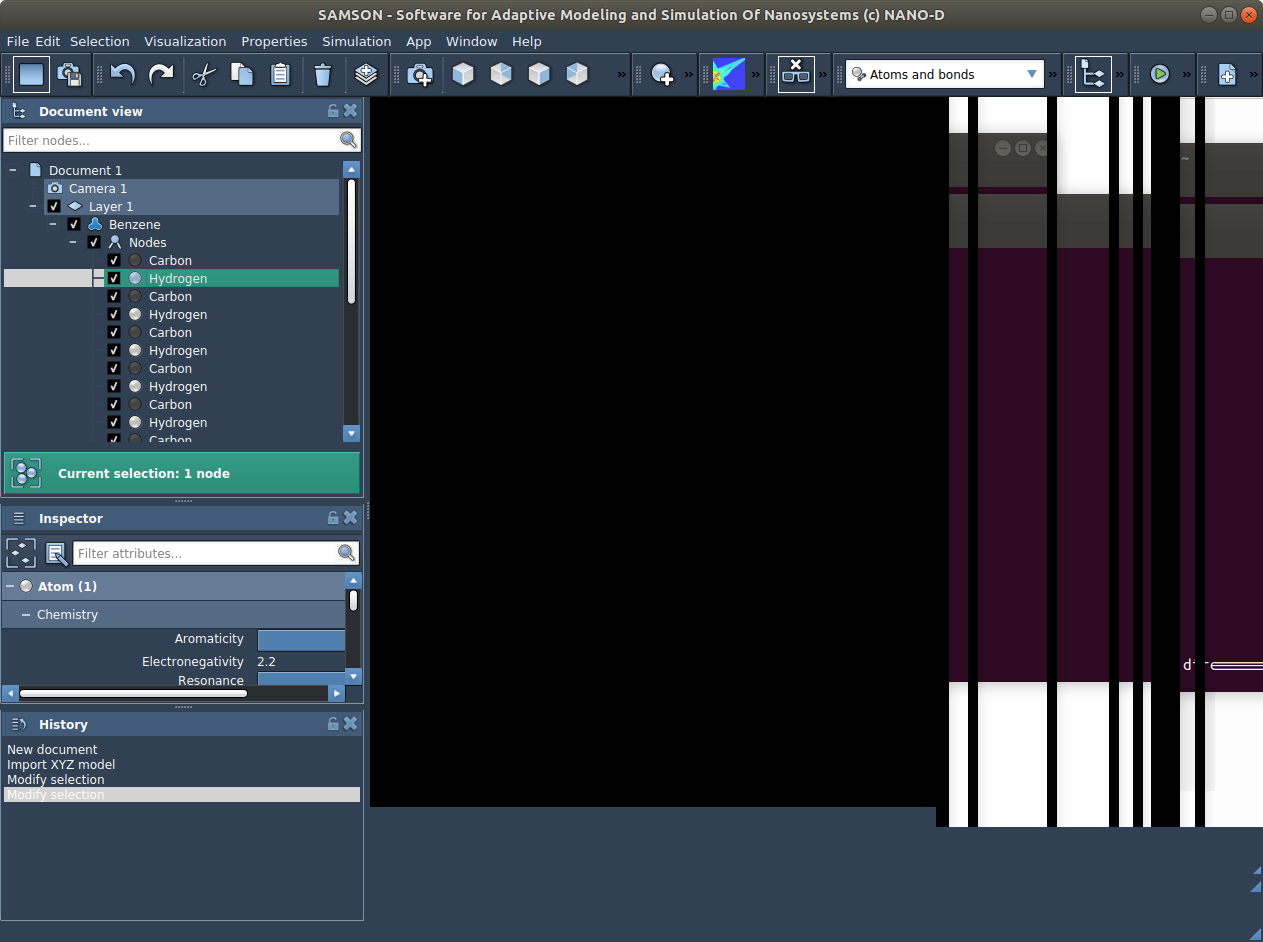
-
In the end of the message when launching SAMSON, I obtain :
....- "elementName" "Graphene Sheet Creator" - "elementDeveloperID" "C682B30F-0D21-4CDB-B968-B72E225DDC8F" - "elementID" "FF9BE415-C812-1C1A-CDBE-78896176B067" - "elementVersion" "0.7.0" - "checksumDebug" 0 - "checksumRelease" 0 - "elementDescription" "" - "elementOS" "" - "samsonVersion" "0.7.0" - "forceUpdate" false -----------------------------------------------------------------------=============================================================================
QPixmap::scaled: Pixmap is a null pixmap
libpng warning: iCCP: known incorrect sRGB profile
libpng warning: iCCP: known incorrect sRGB profile
"File"
"File"
"Edit"
"Edit"
"App"
QLayout: Attempting to add QLayout "" to SBGWidgetOnExit "", which already has a layout
restoring contextThis output is totally ok.
-
What you can also do, if you want to try, is to add a PPA with newer drivers (see this launchpad page) - it provides recently updated X and Mesa free graphics drivers for Intel, etc:
sudo add-apt-repository ppa:oibaf/graphics-drivers
sudo apt-get update
Update with it and may try installing the following package:
sudo apt-get install xserver-xorg-video-intelP.s.: if you install packages from this PPA and later want to update Ubuntu to a newer version it is recommended to remove these packages and PPA before upgrading (see this launchpad page).
-
Thanks for these ideas. I tried but it didn't work.
I still have the same problem.I will maybe focus on my problem for VMD, as you say it is maybe more general than SAMSON, it is a global graphics problem maybe.
Or maybe I could try a complete new installation of SAMSON , don't know if it could rearrange things thanks to the last installed packages...Thanks again, Robert
-
Thanks for these ideas. I tried but it didn't work.
I still have the same problem.I will maybe focus on my problem for VMD, as you say it is maybe more general than SAMSON, it is a global graphics problem maybe.
Or maybe I could try a complete new installation of SAMSON , don't know if it could rearrange things thanks to the last installed packages...Thanks again, Robert
@robert
You can try re-installing, but I do not think it will resolve the issue. -
Hi Dmitryi, hope you are doing well. I tried reinstalling SAMSON but it didn't solve the problem indeed...
I don't want you of course to solve my problem for VMD ^^, (I have also written to VMD for assistance) but I can share you this info , maybe it is linked to the problem I have with SAMSON : when I open vmd (which seems, as SAMSON, perfectly installed), I get the following message in the terminal :Info) VMD for LINUXAMD64, version 1.9.3 (December 1, 2016)
Info) http://www.ks.uiuc.edu/Research/vmd/
Info) Email questions and bug reports to vmd@ks.uiuc.edu
Info) Please include this reference in published work using VMD:
Info) Humphrey, W., Dalke, A. and Schulten, K., `VMD - Visual
Info) Molecular Dynamics', J. Molec. Graphics 1996, 14.1, 33-38.
Info) -------------------------------------------------------------
Info) Multithreading available, 8 CPUs detected.
Info) Free system memory: 28GB (90%)
Info) Dynamically loaded 2 plugins in directory:
Info) /usr/local/lib/vmd/plugins/LINUXAMD64/molfile
vmd >bot nothing opens (no VMD interface).
Moreover, if I type "menu main status", I get "off", anf if I type "menu main on" (to activate the menu), and again "menu main status", I still get "off". If I type "menu list", I get nothing (meaning that there is no available menu, which is why I don't even get the main menu window opening).
What is really strange is that VMD seems to have been perfectly installed, as I can analyse a pdb file as follows :
vmd CF_OX_monomer_11_SAMSON.pdb
in the terminal gives :
Info) VMD for LINUXAMD64, version 1.9.3 (December 1, 2016)
Info) http://www.ks.uiuc.edu/Research/vmd/
Info) Email questions and bug reports to vmd@ks.uiuc.edu
Info) Please include this reference in published work using VMD:
Info) Humphrey, W., Dalke, A. and Schulten, K., `VMD - Visual
Info) Molecular Dynamics', J. Molec. Graphics 1996, 14.1, 33-38.
Info) -------------------------------------------------------------
Info) Multithreading available, 8 CPUs detected.
Info) Free system memory: 28GB (90%)
Info) Dynamically loaded 2 plugins in directory:
Info) /usr/local/lib/vmd/plugins/LINUXAMD64/molfile
Info) File loading in progress, please wait.
Info) Using plugin pdb for structure file CF_OX_monomer_11_SAMSON.pdb
Info) Using plugin pdb for coordinates from file CF_OX_monomer_11_SAMSON.pdb
Info) Determining bond structure from distance search ...
Info) Eliminating bonds duplicated from existing structure...
Info) Finished with coordinate file CF_OX_monomer_11_SAMSON.pdb.
Info) Analyzing structure ...
Info) Atoms: 93
Info) Bonds: 99
Info) Angles: 0 Dihedrals: 0 Impropers: 0 Cross-terms: 0
Info) Bondtypes: 0 Angletypes: 0 Dihedraltypes: 0 Impropertypes: 0
Info) Residues: 1
Info) Waters: 0
Info) Segments: 1
Info) Fragments: 1 Protein: 2 Nucleic: 0
vmd > exit
Info) VMD for LINUXAMD64, version 1.9.3 (December 1, 2016)
Info) Exiting normally.In another computer where VMD works perfectly, I get the following message in the terminal when opening VMD :
/usr/local/lib/vmd/vmd_LINUXAMD64: /usr/lib/x86_64-linux-gnu/mesa/libGL.so.1: no version information available (required by /usr/local/lib/vmd/vmd_LINUXAMD64)
Info) VMD for LINUXAMD64, version 1.9.3 (November 30, 2016)
Info) http://www.ks.uiuc.edu/Research/vmd/
Info) Email questions and bug reports to vmd@ks.uiuc.edu
Info) Please include this reference in published work using VMD:
Info) Humphrey, W., Dalke, A. and Schulten, K., `VMD - Visual
Info) Molecular Dynamics', J. Molec. Graphics 1996, 14.1, 33-38.
Info) -------------------------------------------------------------
Info) Multithreading available, 4 CPUs detected.
Info) CPU features: SSE2 AVX AVX2 FMA
Info) Free system memory: 681MB (35%)
Info) No CUDA accelerator devices available.
Warning) Detected X11 'Composite' extension: if incorrect display occurs
Warning) try disabling this X server option. Most OpenGL drivers
Warning) disable stereoscopic display when 'Composite' is enabled.
Info) OpenGL renderer: SVGA3D; build: RELEASE; LLVM;
Info) Features: STENCIL MDE CVA MTX NPOT PP PS GLSL(OVF)
Info) Full GLSL rendering mode is available.
Info) Textures: 2-D (4096x4096), 3-D (256x256x256), Multitexture (8)
Info) Dynamically loaded 2 plugins in directory:
Info) /usr/local/lib/vmd/plugins/LINUXAMD64/molfile
vmd >=> so OpenGL seems also to be what lacks (at least in the messages in the terminal) for me for VMD to open its menu and graphics, so maybe, concerning SAMSON, it is due to a bad installation of OpenGL, I don't know...
Thank you.
Regards,
Robert -
I think, it might be connected to the Wayland display being used instead of Xorg (see: https://forum.samson-connect.net/topic/37/installing-or-running-samson-on-ubuntu-17-04-and-later-versions). I would suggest you to try installing Xorg and disabling Wayland display.
-
Thank you Dmitryi, I had not seen that trick of disabling Wayland display. I tried and reboot but nothing changed sor SAMSON or VMD display. I don't know how to be sure that Xorg display is used .. When I type "Xorg" (or "Xorg -version") in the terminal I get :
/usr/lib/xorg/Xorg.wrap: Only console users are allowed to run the X server
However when I type "sudo Xorg -version", I get :
X.Org X Server 1.19.6
Release Date: 2017-12-20
X Protocol Version 11, Revision 0
Build Operating System: Linux 4.4.0-138-generic x86_64 Ubuntu
Current Operating System: Linux pl365-pro 4.15.0-47-generic #50-Ubuntu SMP Wed Mar 13 10:44:52 UTC 2019 x86_64
Kernel command line: BOOT_IMAGE=/vmlinuz-4.15.0-47-generic root=/dev/mapper/VGsys-root ro
Build Date: 25 October 2018 04:11:27PM
xorg-server 2:1.19.6-1ubuntu4.2 (For technical support please see http://www.ubuntu.com/support)
Current version of pixman: 0.34.0
Before reporting problems, check http://wiki.x.org
to make sure that you have the latest version.I don't know if it is normal, but I don't have any xorg.conf file in /etc/X11/ (as should be the case according to https://doc.ubuntu-fr.org/xorg). Maybe I should create and edit one such file in that precise directory ?
When I type "locate xorg.conf", I get :
/usr/share/X11/xorg.conf.d
/usr/share/X11/xorg.conf.d/10-amdgpu.conf
/usr/share/X11/xorg.conf.d/10-quirks.conf
/usr/share/X11/xorg.conf.d/10-radeon.conf
/usr/share/X11/xorg.conf.d/40-libinput.conf
/usr/share/X11/xorg.conf.d/70-wacom.conf
/usr/share/doc/xserver-xorg-video-intel/xorg.conf
/usr/share/man/man5/xorg.conf.5.gz
/usr/share/man/man5/xorg.conf.d.5.gzMaybe I should type "sudo dpkg-reconfigure -phigh xserver-xorg" to reconfigure automatically Xorg, as suggested in ttps://doc.ubuntu-fr.org/xorg ?
Thank you.
Robert -
Could you, please, check whether Wayland or X11 display is used, e.g. (please, check for the proper way on Ubuntu):
echo $XDG_SESSION_TYPEor
cat /etc/X11/default-display-manageror
loginctl show-session $(loginctl | grep $(whoami) | awk '{print $1}') -p TypeIf your system is using Xorg and you still experience problems with OpenGL you may try switching to the
lightdmdisplay manager (please, check for Ubuntu 18.04):sudo dpkg-reconfigure lightdm sudo apt-get install lightdm -
Thank you Dmitryi.
cat /etc/X11/default-display-manager
gives me :/usr/sbin/gdm3
echo $XDG_SESSION_TYPE
gives me :
x11loginctl show-session 2 -p Type
gives me :
Type=x11
So I think x11 is turned on and not Wayland, so it seems OK.
I then installed lightdm and replaced gdm3 by lightdm as a display manager, thus :
cat /etc/X11/default-display-manager
gives me now :
/usr/sbin/lightdm
I tried launching SAMSON but nothing changed, maybe I have to reboot and re-try..
Thanks,
Robert -
Thank you Dmitryi.
cat /etc/X11/default-display-manager
gives me :/usr/sbin/gdm3
echo $XDG_SESSION_TYPE
gives me :
x11loginctl show-session 2 -p Type
gives me :
Type=x11
So I think x11 is turned on and not Wayland, so it seems OK.
I then installed lightdm and replaced gdm3 by lightdm as a display manager, thus :
cat /etc/X11/default-display-manager
gives me now :
/usr/sbin/lightdm
I tried launching SAMSON but nothing changed, maybe I have to reboot and re-try..
Thanks,
Robert@robert
Yes, could you, please, try rebooting your system. -
@Robert
Ok. I will try to read more on your issue and will come back to you once I have other ideas. If you solve the problem, could you, please, post the solution here. Thanks! -
Hello Dmitriy, hope you are doing well, I solved my problem for VMD, it was my bad, I had installed the text mode version (I didn't realize I was doing such a mistake ...). The problem for SAMSON was thus completely decorrelated from that of VMD.
For SAMSON, the problem seems related to Ubuntu 18.04 Bionic and Intel i7 8th generation processors. It seems not to suffice that they support OpenGL 3.2. Another person in my team has almost the same computer , installed SAMSON and had the same graphics problem. When he activated his NVIDIA card, SAMSON worked (disgrafully, I don't have a NVIDIA card so I can't use this trick).Maybe it can be due to the libraries SAMSON appeals when it was built, maybe it asks for more than available to these new INTEL processors ? Or it is a specific problem related to Ubuntu 18.04 Bionic with such INTEL processors ... ?
Best regards,
Robert -
Hello @Robert ,
Thanks to your feedback, we have fixed the issue in SAMSON when using Intel integrated graphics processor. You can try installing SAMSON.

Hello! It looks like you're interested in this conversation, but you don't have an account yet.
Getting fed up of having to scroll through the same posts each visit? When you register for an account, you'll always come back to exactly where you were before, and choose to be notified of new replies (either via email, or push notification). You'll also be able to save bookmarks and upvote posts to show your appreciation to other community members.
With your input, this post could be even better 💗
Register Login