Skip to content
0
  • Recent
  • Tags
  • Popular
  • SAMSON Connect
  • Get SAMSON
  • Recent
  • Tags
  • Popular
  • SAMSON Connect
  • Get SAMSON
Collapse
SAMSON Forum
  1. Home
  2. SAMSON
  3. SAMSON Extensions
  4. Apps not showing.

Apps not showing.

Scheduled Pinned Locked Moved SAMSON Extensions
apps
12 Posts 2 Posters 7.9k Views 1 Watching
  • Oldest to Newest
  • Newest to Oldest
  • Most Votes
Reply
  • Reply as topic
Log in to reply
This topic has been deleted. Only users with topic management privileges can see it.
  • M
    M
    Matteo 1
    wrote on last edited by
    #1

    I have some troubles with some apps not showing in the toolbar:
    ARPS demo
    SERealTimeQuantumChemistry
    Twister
    Python scripting
    and others.

    Now, I tried to deal with python scripting first, installing the right version of python in another environment, changing the path to the right environment and the icon of python appeared. Once clicked though, it showed a dialog in the supposed Ipython console saying it was unable to load qt. I think the problem lies in the fact that I cannot set the new environment as default nor donwgrade the default one in Anaconda3 (tried yet and failed due to incompatibility).
    Can someone help me?

    1 Reply Last reply
    0
    • DmitriyMarinD
      DmitriyMarinD
      DmitriyMarin
      wrote on last edited by
      #2

      Concerning the Python Scripting Element, it is necessary to install a particular version of Python (on Windows and Linux we recommend installing it via Anaconda). Could you please verify your installation with the information provided in the Python Scripting: Installation guide for your system.

      Dmitriy,
      The SAMSON Team, https://s-c.io

      1 Reply Last reply
      0
      • DmitriyMarinD
        DmitriyMarinD
        DmitriyMarin
        wrote on last edited by
        #3

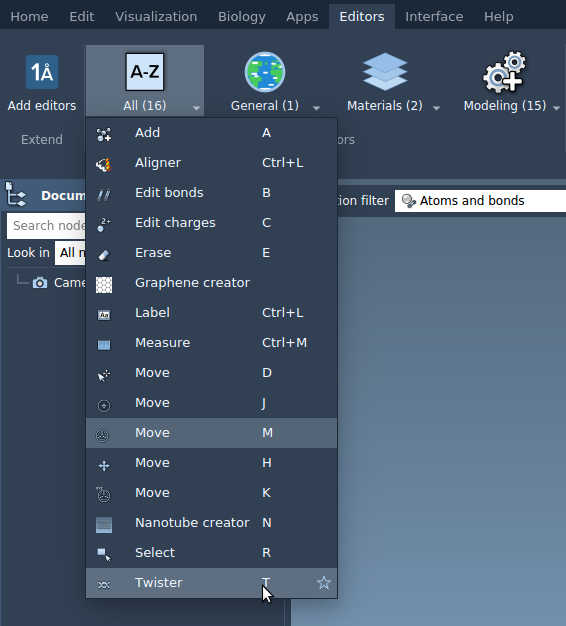
        Concerning Twister. The Twister SAMSON Element does not have an App, it is an Editor and it can be found in the Editors menu. Could you please check whether it is there?

        0_1583936532890_Screenshot from 2020-03-11 15-21-26.png

        Dmitriy,
        The SAMSON Team, https://s-c.io

        1 Reply Last reply
        0
        • DmitriyMarinD
          DmitriyMarinD
          DmitriyMarin
          wrote on last edited by
          #4

          The ARPS Element is deprecated since SAMSON 0.9.0.
          The SERealTimeQuantumChemistry Element has not been updated by its author since SAMSON 0.7.0.

          Dmitriy,
          The SAMSON Team, https://s-c.io

          1 Reply Last reply
          0
          • M
            M
            Matteo 1
            wrote on last edited by
            #5

            No way. I double checked I have followed the indication on the python scripting installation guide. Nevertheless I still get the same message:
            "Could not import qtconsole.rich_jupyter_widget
            Python Scripting: Jupyter QtConsole has not been successfully initialized"

            1 Reply Last reply
            0
            • DmitriyMarinD
              DmitriyMarinD
              DmitriyMarin
              wrote on last edited by
              #6

              @Matteo-1
              Sorry for the issue. Could you please tell us which OS you are using, version of SAMSON, the version of Python/Anaconda you have, and the version of Python that SAMSON detected (you can see it if you launch SAMSON-Console). Do you have only one Python installation?
              Could you please also try to launch the Power Shell (if you are on Windows) or a terminal (on Linux or MacOS) and type "python" and copy here the version it shows.

              Dmitriy,
              The SAMSON Team, https://s-c.io

              1 Reply Last reply
              0
              • M
                M
                Matteo 1
                wrote on last edited by
                #7

                Don't worry, the program looks amazing and I'm still not too practical with informatics so maybe it's me causing some mess:
                OS: Windows10
                SV: SAMSON 2020 (0.11.0)
                AV: Anaconda3-5.2.0
                Powershell text: Python 3.6.5 |Anaconda, Inc.| (default, Mar 29 2018, 13:32:41) [MSC v.1900 64 bit (AMD64)] on win32

                I discovered that the system had a python3.5 installation (I probably installed some years ago. Before uninstalling I tried to run the Samson console but I didn't find the version number. Later I uninstalled it and now Samson crashes on the start with a report dialog opening. The last rows of the console while starting up:
                "QPixmap::scaleHeight: Pixmap is a null pixmap
                QCursor: Cannot create bitmap cursor; invalid bitmap(s)
                QLayout: Attempting to add QLayout "" to QWidget "", which already has a layout
                PDBDowloader: Gzip Importer is not installed - switching off its functionality
                PDBDowloader: PDBx/mmCIF Importer is not installed - switching off its functionality
                PDBDowloader: MMTF Importer is not installed - switching off its functionality
                Python Scripting: initialization ...
                Python library has been successfully loaded
                Fatal Python error: Py_Initialize: unable to load the file system codec
                ModuleNotFoundError: No module named 'encodings'

                Current thread 0x0000308c (most recent call first):"

                Thank you for the patience you are showing.

                1 Reply Last reply
                1
                • DmitriyMarinD
                  DmitriyMarinD
                  DmitriyMarin
                  wrote on last edited by
                  #8

                  @Matteo-1
                  Thank you very much for all this information!
                  So, now you have removed the python 3.5 installed on your system and SAMSON crashes when launching? Unfortunately, I cannot reproduce it for now. Could you please try to restart your system. Could you please check also the environment variables - it should have Anaconda3 paths in it - you can compare them with Python Scripting: Installation of Python on Windows.

                  If you want to launch SAMSON you can remove the Python Scripting Element for now.

                  Dmitriy,
                  The SAMSON Team, https://s-c.io

                  1 Reply Last reply
                  1
                  • M
                    M
                    Matteo 1
                    wrote on last edited by Matteo 1
                    #9

                    Exactly the same environment variables as shown in the guide, except for the user name. I tried to restart but nothing new happened, it still crashes.

                    1 Reply Last reply
                    0
                    • DmitriyMarinD
                      DmitriyMarinD
                      DmitriyMarin
                      wrote on last edited by
                      #10

                      Since I cannot reproduce this behavior, is it possible for you to uninstall Anaconda3 and then re-install it again? Sorry for the inconvenience.

                      Dmitriy,
                      The SAMSON Team, https://s-c.io

                      1 Reply Last reply
                      1
                      • M
                        M
                        Matteo 1
                        wrote on last edited by
                        #11

                        Definitely solved! Thank you so much!

                        DmitriyMarinD 1 Reply Last reply
                        1
                        • M Matteo 1

                          Definitely solved! Thank you so much!

                          DmitriyMarinD
                          DmitriyMarinD
                          DmitriyMarin
                          wrote on last edited by
                          #12

                          @Matteo-1

                          Great! Thank you very much for informing! I am glad it solved the issue.

                          Dmitriy,
                          The SAMSON Team, https://s-c.io

                          1 Reply Last reply
                          2

                          Hello! It looks like you're interested in this conversation, but you don't have an account yet.

                          Getting fed up of having to scroll through the same posts each visit? When you register for an account, you'll always come back to exactly where you were before, and choose to be notified of new replies (either via email, or push notification). You'll also be able to save bookmarks and upvote posts to show your appreciation to other community members.

                          With your input, this post could be even better 💗

                          Register Login
                          Reply
                          • Reply as topic
                          Log in to reply
                          • Oldest to Newest
                          • Newest to Oldest
                          • Most Votes


                          • Login

                          • Login or register to search.
                          • First post
                            Last post