
How to compute molecular properties like logP & logD - hydrophobicity
-
Hi all,
I have created a drug design and I would like to calculate its logP and logD properties and get in general a better understanding on which drug delivery carriers are appropriate for this design. Do I have to run a simulation or sth to calculate properties like these? Is there an app in general that can give me more info on drug delivery?
Kind regards,
Thanos Pasias -
Hello @Thanos ,
As far as I know, there is no app that computes logP and logD properties. But if you want to visualize the hydrophobicity of a protein you can do this by applying a hydrophobicity color scheme (you can also change the hydrophobicity scales).
-
Hello @Thanos ,
As far as I know, there is no app that computes logP and logD properties. But if you want to visualize the hydrophobicity of a protein you can do this by applying a hydrophobicity color scheme (you can also change the hydrophobicity scales).
@dmitriymarin Hi! Thank you for your reply. I didn't know that, this is the first time I do this :) thanks. I have found the hydrophobicity button, is the red color more or less hydrophobic? Also how does the polarity color palette work? The darker the color the greater the polarity is?
-
@dmitriymarin Hi! Thank you for your reply. I didn't know that, this is the first time I do this :) thanks. I have found the hydrophobicity button, is the red color more or less hydrophobic? Also how does the polarity color palette work? The darker the color the greater the polarity is?
@thanos For hydrophobicity: blue is the minimum value of hydrophobicity (more hydrophilic - hence blue) and red is the maximum value of hydrophobicity.

As for the polarity, the colors are just descriptive - to differentiate between the types of the side chain polarity: non polar, polar, acidic polar, basic polar.
In the default color scheme: nonpolar - violet, polar - light blue, acidic polar - light green, basic polar - yellow.

You can see it through the Inspector when selecting a residue:
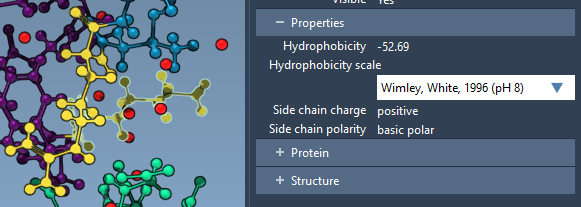
In the next update of SAMSON, it would be possible to select the color palettes. -
@thanos For hydrophobicity: blue is the minimum value of hydrophobicity (more hydrophilic - hence blue) and red is the maximum value of hydrophobicity.
As for the polarity, the colors are just descriptive - to differentiate between the types of the side chain polarity: non polar, polar, acidic polar, basic polar.
In the default color scheme: nonpolar - violet, polar - light blue, acidic polar - light green, basic polar - yellow.
You can see it through the Inspector when selecting a residue:
In the next update of SAMSON, it would be possible to select the color palettes.@dmitriymarin Wow this is really great, thank you!!!

Hello! It looks like you're interested in this conversation, but you don't have an account yet.
Getting fed up of having to scroll through the same posts each visit? When you register for an account, you'll always come back to exactly where you were before, and choose to be notified of new replies (either via email, or push notification). You'll also be able to save bookmarks and upvote posts to show your appreciation to other community members.
With your input, this post could be even better 💗
Register Login