
Transparency and Set color for Gaussian Surface Visual Model does not work
-
- The problem of transparency: after loading a protein structure (pdb file), I create a Secondary structure and a Gaussian surface Visual models on the the protein structure. I then set the transparency for the Gaussian surface, but I cannot see the secondary structure below the surface
- I right clicked on the Gaussian surface and set a color of a constant value. It does not work
Does anyone have the solutions?
-
Gaussian surfaces may be slow to recompute sometimes (e.g. for large molecules), so there is an "Update" button to recompute the surface. You need to use it when you change the color.
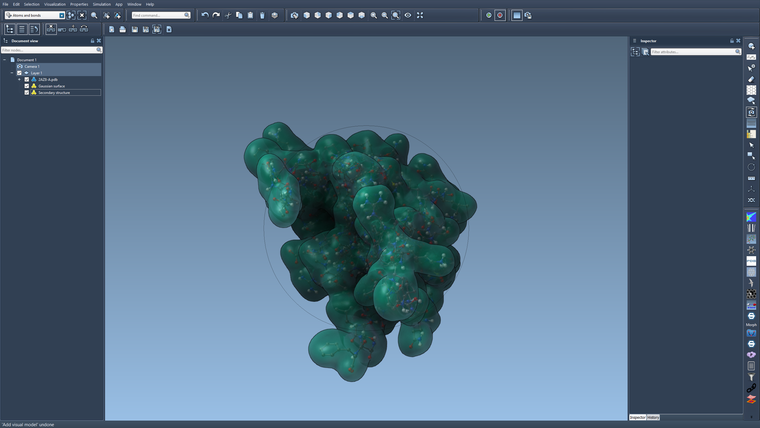
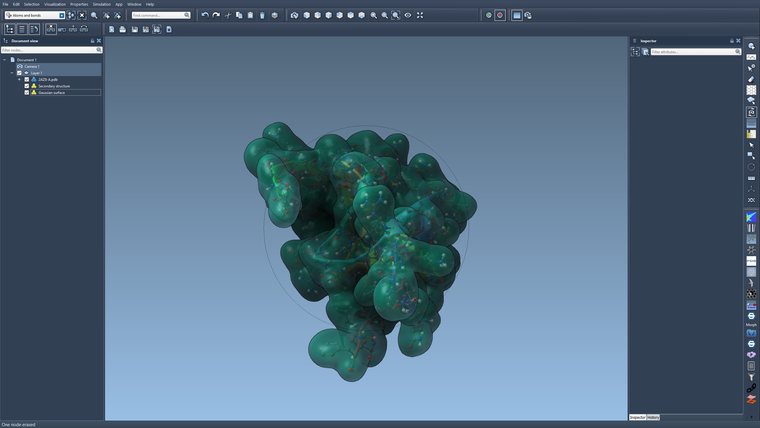
About the transparency: it depends on the order of visual models. Since order-independent transparency is not yet implemented, you will see the secondary structure only if it comes before the gaussian surface (when you traverse the document in depth-first order).
Here is an example with the Gaussian surface first:
And here is an example with the Gaussian surface after the secondary structure:

Hello! It looks like you're interested in this conversation, but you don't have an account yet.
Getting fed up of having to scroll through the same posts each visit? When you register for an account, you'll always come back to exactly where you were before, and choose to be notified of new replies (either via email, or push notification). You'll also be able to save bookmarks and upvote posts to show your appreciation to other community members.
With your input, this post could be even better 💗
Register Login