
It stoped at 29% during installation
-
Hi all,
Since I have faced some problem during installation on my computer which has Ubuntu 20.04 LTS as OS.
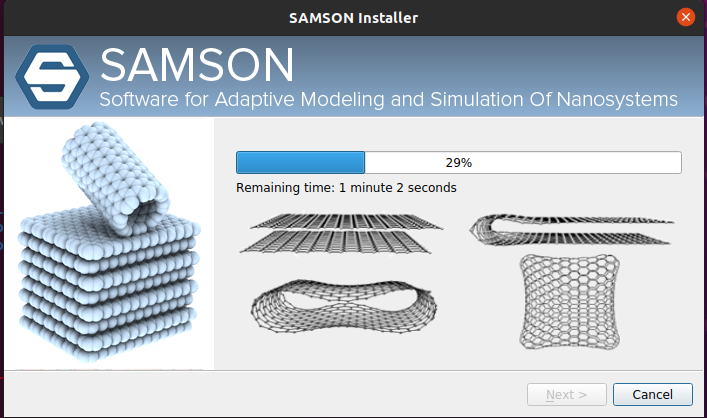
It stopped at 29% during installation.
Although I have uninstalled the SAMSON completely in my system, I stopped again.
I have just ran the install command with ./SAMSON-setup.run .
and I have read about the NVIDIA issue in the forum therefore, I have followed the installing which they recommand.
How can I solve the problem.
Thank you for your kind help.
Doyoun Kim
-
-
Hello,
Although I have re-install Ubuntu with 200GB mounted in /, it still stoped around 29
When I run %df -l, it showed below
Filesystem 1K-blocks Used Available Use% Mounted on
udev 131770300 0 131770300 0% /dev
tmpfs 26361104 2888 26358216 1% /run
/dev/nvme0n1p2 191197068 11936596 169478456 7% /
tmpfs 131805512 46716 131758796 1% /dev/shm
tmpfs 5120 4 5116 1% /run/lock
tmpfs 131805512 0 131805512 0% /sys/fs/cgroup
/dev/loop0 9216 9216 0 100% /snap/canonical-livepatch/132
/dev/loop2 289280 289280 0 100% /snap/pymol-oss/98
/dev/loop1 113280 113280 0 100% /snap/core/12834
/dev/loop3 33152 33152 0 100% /snap/snapd/12704
/dev/loop4 63488 63488 0 100% /snap/core20/1405
/dev/loop5 66688 66688 0 100% /snap/gtk-common-themes/1515
/dev/loop6 254848 254848 0 100% /snap/gnome-3-38-2004/99
/dev/loop7 56832 56832 0 100% /snap/core18/2128
/dev/loop8 224256 224256 0 100% /snap/gnome-3-34-1804/72
/dev/nvme0n1p3 758522328 506548 719415232 1% /home
/dev/nvme0n1p1 9755312 5384 9749928 1% /boot/efi
/dev/nvme1n1p1 960379920 77856 911447640 1% /home2
/dev/loop9 52224 52224 0 100% /snap/snap-store/547
tmpfs 26361100 20 26361080 1% /run/user/125
tmpfs 26361100 44 26361056 1% /run/user/1000I think it is not a space problem though, I don't know how to solve this problems.
please help,

Hello! It looks like you're interested in this conversation, but you don't have an account yet.
Getting fed up of having to scroll through the same posts each visit? When you register for an account, you'll always come back to exactly where you were before, and choose to be notified of new replies (either via email, or push notification). You'll also be able to save bookmarks and upvote posts to show your appreciation to other community members.
With your input, this post could be even better 💗
Register Login