
The use of displayText function
-
I would like to display a text at the same position as atoms (e.g: display three atoms' serial number). I looked at displayText(std::string text, const SBPosition3 &position, std::string fontFamily, int fontSize, float ∗ color) function but I have some compilation errors. Please, would you mind giving me an example of using this function?
-
Starting with SAMSON 0.6.0, the displayText function takes a QFont instead of a std::string (see the SAMSON class in SDK/0.6.0/include/Facade/SAMSON/SAMSON.hpp, or the documentation at https://documentation.samson-connect.net), to give developers more control. An example would thus be to include the following lines in the display function of e.g. a visual model (derived from
SBVisualModel) or a label (derived fromSBLabel):float color[4] = { 1.0, 1.0, 0.5, 1.0 }; // red, green, blue, alpha SAMSON::displayText("Hello world", SBPosition3(SBQuantity::angstrom(0.0), SBQuantity::angstrom(0.0), SBQuantity::angstrom(0.0)), QFont("Segoe UI", 60, 200), color);This would produce the following text at the origin:

-
Starting with SAMSON 0.6.0, the displayText function takes a QFont instead of a std::string (see the SAMSON class in SDK/0.6.0/include/Facade/SAMSON/SAMSON.hpp, or the documentation at https://documentation.samson-connect.net), to give developers more control. An example would thus be to include the following lines in the display function of e.g. a visual model (derived from
SBVisualModel) or a label (derived fromSBLabel):float color[4] = { 1.0, 1.0, 0.5, 1.0 }; // red, green, blue, alpha SAMSON::displayText("Hello world", SBPosition3(SBQuantity::angstrom(0.0), SBQuantity::angstrom(0.0), SBQuantity::angstrom(0.0)), QFont("Segoe UI", 60, 200), color);This would produce the following text at the origin:
-
Starting with SAMSON 0.6.0, the displayText function takes a QFont instead of a std::string (see the SAMSON class in SDK/0.6.0/include/Facade/SAMSON/SAMSON.hpp, or the documentation at https://documentation.samson-connect.net), to give developers more control. An example would thus be to include the following lines in the display function of e.g. a visual model (derived from
SBVisualModel) or a label (derived fromSBLabel):float color[4] = { 1.0, 1.0, 0.5, 1.0 }; // red, green, blue, alpha SAMSON::displayText("Hello world", SBPosition3(SBQuantity::angstrom(0.0), SBQuantity::angstrom(0.0), SBQuantity::angstrom(0.0)), QFont("Segoe UI", 60, 200), color);This would produce the following text at the origin:
@stephane-redon I tried with a visual model and this is what I got as result:

I would like to get this kind of result (for instance: put on each atom its serial number):
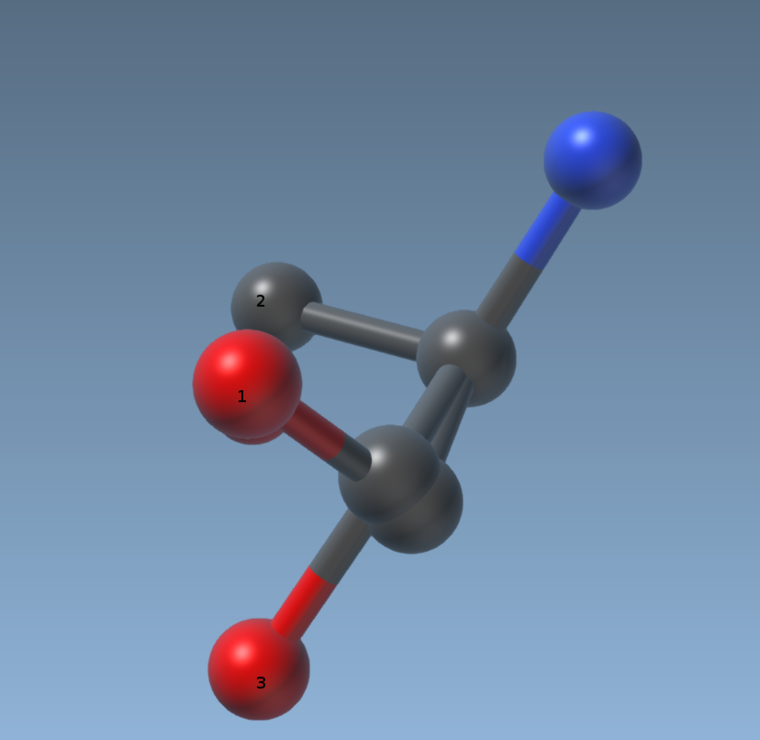
Is it possible? I am looking for the way to add a label like SAMSON ruler element does.
Thank you in advance
-
Could you please check to see what happens when you add an atom in the document? There might be an issue when you only have a visual model that displays text, and nothing else. Once this works, it should be easy to position the text on the atoms by sending their position to the
displayTextfunction. -
Could you please check to see what happens when you add an atom in the document? There might be an issue when you only have a visual model that displays text, and nothing else. Once this works, it should be easy to position the text on the atoms by sending their position to the
displayTextfunction.Hi @stephane-redon, sorry for my late response. When I add atoms, nothing happens, they are correctly added.
I have a visual model that displays arrow on atoms. It reads coordinates from a file and then displays arrows. My problem is that I would like to displays arrows when the user clicks on a button. I tried the way a structural model is added to the active layer programmatically but it does not work. Please, would mind helping me with it?
This is just an inspiration from how a structural model is added:
SBMVisualModel* visualModel = new SBMVisualModel();
visualModel->setName("VP_Arrows");

SAMSON::beginHolding("Display vp by arrows");

SEFleXibleVisualModel vModel; // this is my visual model
vModel.fileName = vp_file; // this is to set the coordinates file

//visualModel.display(); // I don't know if I need to call this method or not
visualModel->addChild(vModel); // add my visual model to the SBMVisualModel

visualModel->create();
SAMSON::getActiveLayer()->addChild(visualModel); // add to the active layer
If this is solved I think I could then display atoms' serial numbers
Thank you in advance.
-
Hi @stephane-redon, sorry for my late response. When I add atoms, nothing happens, they are correctly added.
I have a visual model that displays arrow on atoms. It reads coordinates from a file and then displays arrows. My problem is that I would like to displays arrows when the user clicks on a button. I tried the way a structural model is added to the active layer programmatically but it does not work. Please, would mind helping me with it?
This is just an inspiration from how a structural model is added:
SBMVisualModel* visualModel = new SBMVisualModel();
visualModel->setName("VP_Arrows");

SAMSON::beginHolding("Display vp by arrows");

SEFleXibleVisualModel vModel; // this is my visual model
vModel.fileName = vp_file; // this is to set the coordinates file

//visualModel.display(); // I don't know if I need to call this method or not
visualModel->addChild(vModel); // add my visual model to the SBMVisualModel

visualModel->create();
SAMSON::getActiveLayer()->addChild(visualModel); // add to the active layer
If this is solved I think I could then display atoms' serial numbers
Thank you in advance.
@Stephane-Redon, it's done :) Thanks. Here's what I did:
SEFleXibleVisualModel* model = new SEFleXibleVisualModel(vp_file, "vp"); // my visual model
model->setName("VP_Arrows");

SAMSON::beginHolding("Display vp by arrows");
SAMSON::hold(model);

model->create();
SAMSON::getActiveLayer()->addChild(model);

// stop holding changes to the document
SAMSON::endHolding();

Hello! It looks like you're interested in this conversation, but you don't have an account yet.
Getting fed up of having to scroll through the same posts each visit? When you register for an account, you'll always come back to exactly where you were before, and choose to be notified of new replies (either via email, or push notification). You'll also be able to save bookmarks and upvote posts to show your appreciation to other community members.
With your input, this post could be even better 💗
Register Login