
Getting atoms inside a .stl object
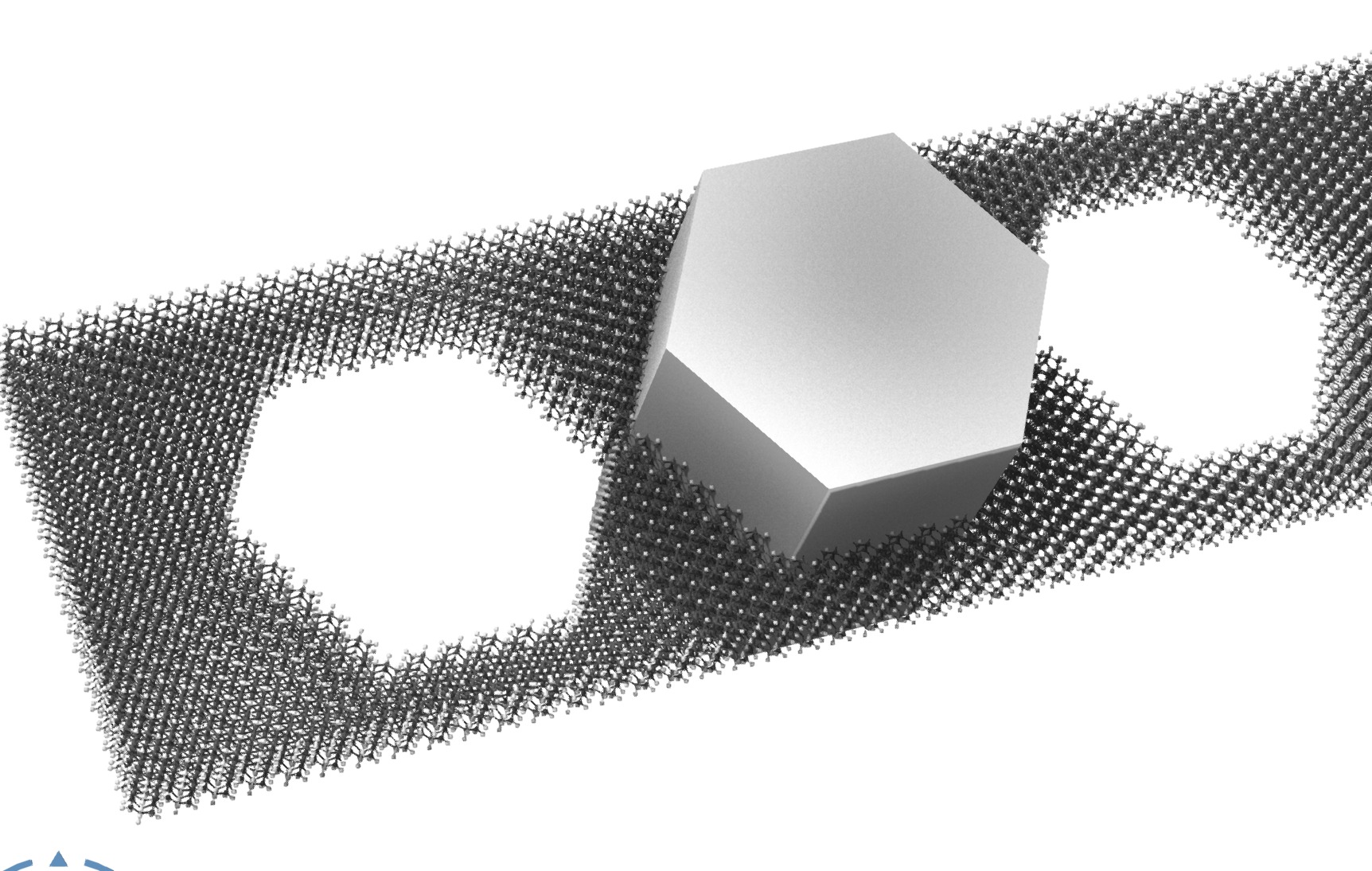
-
Hi Tom, it might be possible to use some computational geometry libraries that would determine whether a point in inside a triangulated object (it's non trivial for non-convex objects, but they can often be decomposed into convex parts). I'll look into the serialization of the STL objects but I don't immediately see any issues.
-
This one might help: https://github.com/quant-sci/compute-geometry. If you have a convex object like the one in the image, I guess you'd first compute its convex hull thanks to this library, and you'd then use the resulting convex hull to determine whether an atom is inside or not.
-
Thanks for the replies and guidance. I was looking at a couple external libraries to work with stls. I got stuck because I couldn't find anyway to access the stl object through the SAMSON python api then I found Mesh = NodeType.VisualModelMesh? I will work on it again.
-
-
The STL importer is actually creating an object of its own class, and cannot be manipulated like a mesh. I'm going to modify that importer so it produces meshes instead. At the moment, you can import obj files instead. However, we also need to expose surfaces in python (meshes are collections of surfaces), which are the classes which expose the underlying vertices and triangles. Without this, you will not be able to do the geometry tests in python (the API is available in C++ though, see https://documentation.samson-connect.net/developers/latest/api/classSBMVisualModelSurface/)
-
-
I've updated the STL importer. Opening a STL object into SAMSON will now create meshes instead of the previous type of objects (but loading your previous files should work again and will create the previous type of objects, I was able to import your file). The benefit of meshes is that they're the standard way to have triangulated geometry in SAMSON, and you can move them, rotate them, align them, etc. (and we'll expose the underlying surfaces in Python so we can do geometry tests). The update will be available with SAMSON 2026 R1, which should arrive very soon now.
-
That's awesome! I can't wait to try it out. In addition to the crystal carver project, I've done experiments connecting mesh objects and updating them in near real-time from molecular dynamics data. You can see an example here: https://www.youtube.com/watch?v=vMpnWHdG2Ds I actually have a good use case for this. I wonder if anyone else does? Also in the future SAMSON could be used for systems that span from quantum modeling through classical molecular dynamics and into rigid-body-FEA-Multiphysics simulations. I am not aware of any other platform that can do that.
-
Multiscale is definitely worth looking into. Dmitriy exposed surfaces in Python, so here's a script you'll be able to use to carve. It takes the first mesh of the document, and creates two selection groups: one for the atoms inside the mesh, and one for the atoms outside the mesh. It assumes the mesh is watertight to determine whether a point is inside or not. It's not optimized at all but it does the job. (and this script will only work starting with 2026 R1).
import math

# ------------------------------------------------------------
# Configuration
# ------------------------------------------------------------

MESH_NSL = 'node.type mesh'
ATOM_NSL= 'node.type atom'
EPS = 1.0e-9                # geometric tolerance

# Use a ray direction that is very unlikely to hit many edges exactly
RAY_DIR = (1.0, 0.3713906763541037, 0.2182178902359924)


# ------------------------------------------------------------
# Small vector utilities
# ------------------------------------------------------------

def v_add(a, b):
    return (a[0] + b[0], a[1] + b[1], a[2] + b[2])

def v_sub(a, b):
    return (a[0] - b[0], a[1] - b[1], a[2] - b[2])

def v_dot(a, b):
    return a[0]*b[0] + a[1]*b[1] + a[2]*b[2]

def v_cross(a, b):
    return (
        a[1]*b[2] - a[2]*b[1],
        a[2]*b[0] - a[0]*b[2],
        a[0]*b[1] - a[1]*b[0],
    )

def v_scale(a, s):
    return (a[0]*s, a[1]*s, a[2]*s)

def v_norm(a):
    return math.sqrt(v_dot(a, a))

def v_normalize(a):
    n = v_norm(a)
    if n < EPS:
        return a
    return (a[0]/n, a[1]/n, a[2]/n)


# ------------------------------------------------------------
# Accessors / conversions
# ------------------------------------------------------------

def atom_to_point(atom):
    return (atom.getX().value, atom.getY().value, atom.getZ().value)

def position_to_point(position):
    return (position.x.value, position.y.value, position.z.value)


# ------------------------------------------------------------
# Mesh extraction
# ------------------------------------------------------------

def extract_triangles_from_mesh(mesh):
    """
    Build a flat triangle list [(v0, v1, v2), ...] from all surfaces of a mesh.

    Assumes the positions returned by the surfaces are already in the same
    coordinate frame as the atoms. If your mesh carries a non-identity spatial
    transform, apply that transform to the vertices before classification.
    """
    triangles = []
    transform = mesh.getTransform()

    for surface in mesh.getSurfaces():
        pos = surface.getPositionData()
        idx = surface.getIndexData()

        n_pos = int(len(surface.getPositionData())/3)
        n_tri = int(len(surface.getIndexData())/3)

        verticesPreTransform = [ SBPosition3(SBQuantity.pm(pos[3*i]), SBQuantity.pm(pos[3*i + 1]), SBQuantity.pm(pos[3*i + 2])) for i in range(n_pos) ]
        verticesPostTransform = [ transform.transformPoint(verticesPreTransform[i]) for i in range(n_pos) ]
        vertices = [ position_to_point(verticesPostTransform[i]) for i in range(n_pos) ]

        for t in range(n_tri):
            i0 = int(idx[3*t])
            i1 = int(idx[3*t + 1])
            i2 = int(idx[3*t + 2])
            triangles.append((vertices[i0], vertices[i1], vertices[i2]))

    return triangles


# ------------------------------------------------------------
# Point / triangle predicates
# ------------------------------------------------------------

def point_on_triangle(p, a, b, c, eps=EPS):
    """
    Check whether p lies on triangle abc within tolerance.
    """
    ab = v_sub(b, a)
    ac = v_sub(c, a)
    ap = v_sub(p, a)

    n = v_cross(ab, ac)
    nn = v_dot(n, n)
    if nn < eps:
        return False  # degenerate triangle

    # Distance from point to triangle plane
    dist_num = abs(v_dot(ap, n))
    if dist_num > eps * math.sqrt(nn):
        return False

    # Barycentric test
    d00 = v_dot(ab, ab)
    d01 = v_dot(ab, ac)
    d11 = v_dot(ac, ac)
    d20 = v_dot(ap, ab)
    d21 = v_dot(ap, ac)

    denom = d00 * d11 - d01 * d01
    if abs(denom) < eps:
        return False

    v = (d11 * d20 - d01 * d21) / denom
    w = (d00 * d21 - d01 * d20) / denom
    u = 1.0 - v - w

    return (
        -eps <= u <= 1.0 + eps and
        -eps <= v <= 1.0 + eps and
        -eps <= w <= 1.0 + eps
    )


def ray_intersects_triangle(origin, direction, a, b, c, eps=EPS):
    """
    Moller-Trumbore ray/triangle intersection.
    Returns distance t along the ray if there is a strict hit, else None.

    We exclude hits too close to the origin (t <= eps) to avoid self-counting.
    """
    edge1 = v_sub(b, a)
    edge2 = v_sub(c, a)

    h = v_cross(direction, edge2)
    det = v_dot(edge1, h)

    if abs(det) < eps:
        return None  # parallel or nearly parallel

    inv_det = 1.0 / det
    s = v_sub(origin, a)
    u = inv_det * v_dot(s, h)
    if u < -eps or u > 1.0 + eps:
        return None

    q = v_cross(s, edge1)
    v = inv_det * v_dot(direction, q)
    if v < -eps or u + v > 1.0 + eps:
        return None

    t = inv_det * v_dot(edge2, q)
    if t <= eps:
        return None

    return t


def point_in_watertight_mesh(point, triangles, eps=EPS):
    """
    Parity test:
      - if the point lies on the surface -> treat as inside
      - else count ray/triangle intersections
    """
    # Boundary inclusion
    for a, b, c in triangles:
        if point_on_triangle(point, a, b, c, eps):
            return True

    direction = v_normalize(RAY_DIR)

    # Collect unique hits; this reduces double-counting when the ray passes
    # through shared triangle edges or coplanar patches.
    hits = []

    for a, b, c in triangles:
        t = ray_intersects_triangle(point, direction, a, b, c, eps)
        if t is not None:
            hits.append(t)

    if not hits:
        return False

    hits.sort()

    unique_hits = []
    for t in hits:
        if not unique_hits or abs(t - unique_hits[-1]) > 1.0e-7:
            unique_hits.append(t)

    return (len(unique_hits) % 2) == 1


# ------------------------------------------------------------
# Main
# ------------------------------------------------------------

mesh_indexer = SAMSON.getNodes(MESH_NSL)
if len(mesh_indexer) == 0:
    raise RuntimeError(f"No mesh found with NSL: {MESH_NSL}")

mesh = mesh_indexer[0]
print("Mesh:", mesh)

triangles = extract_triangles_from_mesh(mesh)
print("Number of triangles:", len(triangles))

if len(triangles) == 0:
    raise RuntimeError("The mesh contains no triangles.")

atom_indexer = SAMSON.getNodes(ATOM_NSL)

inside_indexer = SBNodeIndexer()
outside_indexer = SBNodeIndexer()

for atom in atom_indexer:
    p = atom_to_point(atom)
    if point_in_watertight_mesh(p, triangles):
        inside_indexer.addNode(atom)
    else:
        outside_indexer.addNode(atom)

print("Atoms inside:", inside_indexer.size)
print("Atoms outside:", outside_indexer.size)

inside_group = SBNodeGroup('inside ' + mesh.name, inside_indexer)
outside_group = SBNodeGroup('outside ' + mesh.name, outside_indexer)

with SAMSON.holding("Create carving groups"):
    inside_group.create()
    SAMSON.getActiveDocument().addChild(inside_group)
    outside_group.create();
    SAMSON.getActiveDocument().addChild(outside_group)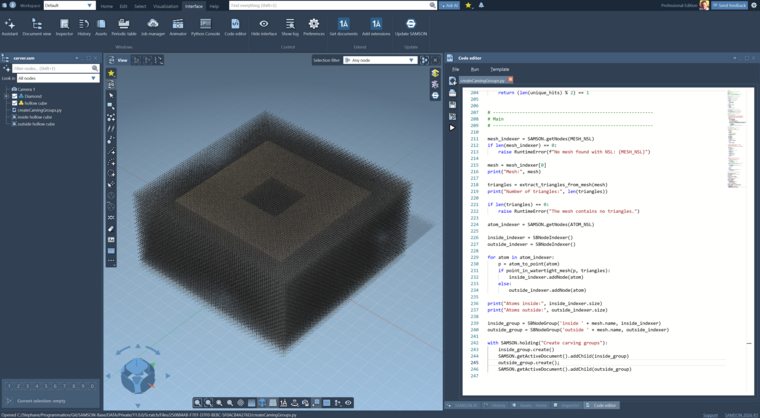
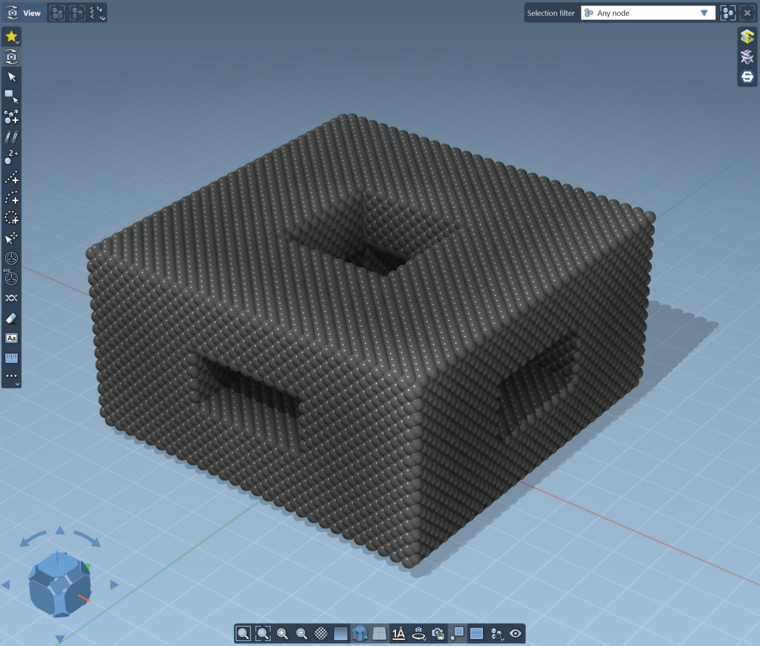
You can then use these groups to delete the atoms you don't want. For example when you delete the atoms in the 'outside' group:
-
This is going to be so cool. It will allow me to make parts so much faster, and parts can be made larger than in NE1. Perhaps Z88 would make a good extension to do exciting stuff with meshes inside SAMSON. https://en.wikipedia.org/wiki/Z88_FEM_software

Hello! It looks like you're interested in this conversation, but you don't have an account yet.
Getting fed up of having to scroll through the same posts each visit? When you register for an account, you'll always come back to exactly where you were before, and choose to be notified of new replies (either via email, or push notification). You'll also be able to save bookmarks and upvote posts to show your appreciation to other community members.
With your input, this post could be even better 💗
Register Login