Skip to content
0
  • Recent
  • Tags
  • Popular
  • SAMSON Connect
  • Get SAMSON
  • Recent
  • Tags
  • Popular
  • SAMSON Connect
  • Get SAMSON
Collapse
SAMSON Forum
  1. Home
  2. SAMSON
  3. SAMSON Extensions
  4. Is the "Interactive State Updater" available in 0.8.5?

Is the "Interactive State Updater" available in 0.8.5?

Scheduled Pinned Locked Moved SAMSON Extensions
9 Posts 3 Posters 7.2k Views 1 Watching
  • Oldest to Newest
  • Newest to Oldest
  • Most Votes
Reply
  • Reply as topic
Log in to reply
This topic has been deleted. Only users with topic management privileges can see it.
  • P
    P
    Petr 0
    wrote on last edited by
    #1

    I reproduced the Springs developer tutorial in the programming part. However, I cannot select the interactive state updater which is recommended in the tutorial. I have only FIRE state updater.

    I am using Samson version 0.8.5.

    How to get the interactive state updater selectable?

    1 Reply Last reply
    0
    • DmitriyMarinD
      DmitriyMarinD
      DmitriyMarin
      wrote on last edited by
      #2

      Hello @Petr-0

      Yes, it is available on SAMSON 0.8.5.
      Could you, please, check whether you have the State Updater Pack Element, it contains the Interactive modeling updater and other state updaters. Once you add it, you need to restart SAMSON such that SAMSON could download it and install it.

      If you have it added and still do not see it in your SAMSON, could you, please, open the Log viewer in SAMSON (Interface menu > Log viewer) and type in the Filter 'State'. You should see 2 lines: one with an information on the Elements installation and another one with an information on whether it was loaded successfully or not. See the picture below.
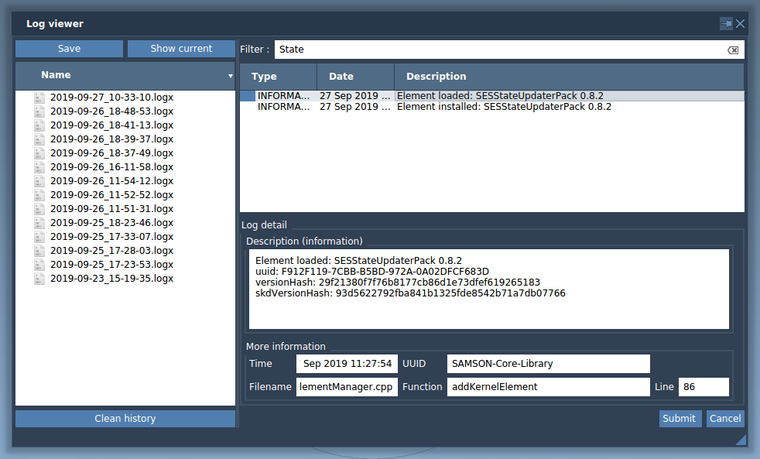
      0_1569577016088_LogViewer-StateUpdaterPack.png
      If one of these lines is red, please, post here the description from the Log detail.

      Dmitriy,
      The SAMSON Team, https://s-c.io

      1 Reply Last reply
      0
      • P
        P
        Petr 0
        wrote on last edited by
        #3

        Yes, I don't find the lines with State in them.

        I submitted the log over the app.

        1 Reply Last reply
        0
        • DmitriyMarinD
          DmitriyMarinD
          DmitriyMarin
          wrote on last edited by
          #4

          Thank you for submitting the log! We will check it.

          Do you have the State Updater Pack Element added from SAMSON Connect?

          If you don't find these lines with StateUpdaterPack in the log, it means that you do not have this Element added and installed.

          Dmitriy,
          The SAMSON Team, https://s-c.io

          1 Reply Last reply
          0
          • P
            P
            Petr 0
            wrote on last edited by
            #5

            I cannot find this element in the elements page https://www.samson-connect.net/elements.html neither with search, nor in the section All.

            I think this element got omitted for some reason.

            Thank you for providing the direct link.

            How to see the whole list of elements available?

            1 Reply Last reply
            0
            • P
              P
              Petr 0
              wrote on last edited by
              #6

              Ok, I can see more under My Samson...

              1 Reply Last reply
              0
              • DmitriyMarinD
                DmitriyMarinD
                DmitriyMarin
                wrote on last edited by
                #7

                Yes, this is a default Element, meaning every user has it by default when he/she registers. Default Elements (e.g. basic impoters, exporters, state updaters) are not shown in the list of SAMSON Elements, but they are shown on the My SAMSON page (you need to be logged in to see it) from where they you can remove them from your SAMSON installation or add them again later.

                Log in on SAMSON Connect, follow the State Updater Pack Element link and click Add.

                Dmitriy,
                The SAMSON Team, https://s-c.io

                1 Reply Last reply
                0
                • P
                  P
                  Petr 0
                  wrote on last edited by
                  #8

                  My troubles indicate that the default elements better also be shown in the list of All SAMSON Elements. Please, consider this as a feature request. Namely, a feature that all elements are shown in the section All SAMSON Elements.

                  1 Reply Last reply
                  0
                  • StephaneS
                    StephaneS
                    Stephane
                    wrote on last edited by Stephane
                    #9

                    Hi Petr, thanks for the suggestion. We are thinking we might actually go the opposite route, i.e. hide these elements from My SAMSON / My Elements, so that they cannot be removed.

                    1 Reply Last reply
                    0

                    Hello! It looks like you're interested in this conversation, but you don't have an account yet.

                    Getting fed up of having to scroll through the same posts each visit? When you register for an account, you'll always come back to exactly where you were before, and choose to be notified of new replies (either via email, or push notification). You'll also be able to save bookmarks and upvote posts to show your appreciation to other community members.

                    With your input, this post could be even better 💗

                    Register Login
                    Reply
                    • Reply as topic
                    Log in to reply
                    • Oldest to Newest
                    • Newest to Oldest
                    • Most Votes


                    • Login

                    • Login or register to search.
                    • First post
                      Last post