
Docking results export
-
-
-
Hi there, Thanks for such a quick response!
I know, I should never rush developers, but when do you think this feature would be added?
Second question: I have files (in Samson format) with docked libraries, would the extension allow me to export already dock compounds?
-
Hi @Bartosz
You can already export the docked compounds. Simply select the ligand or ligands in the Document view and click Export in the Home > Select menu, or you can save the whole document in any format supported by SAMSON (.pdb, .mol2, etc).
We expect to release the updated version of the AutoDock Vina Extended element just after the release of SAMSON 2020 R2 in the upcoming days. So you might expect it this Tuesday/Wednesday.
And do not hesitate, we love getting feedback and feature requests!
-
-
In the new version, it will be possible to export in a .csv file the current docking results, but not for the files that have been already run, since a document doesn't keep this information.
-
-
-
Hi @Bartosz,
Yes, SAMSON 2020 R2 is in the process of releasing right now. The AutoDock Vina Extended element will be updated tomorrow. I will let you know!
-
-
We are excited as well! ;)
-
Dear @Bartosz,
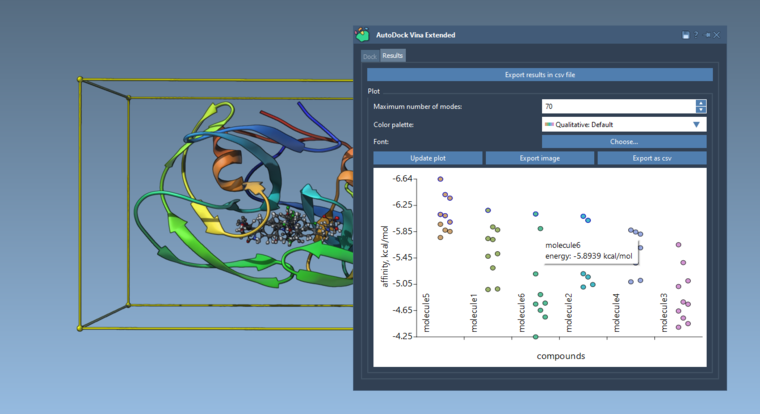
We have updated the AutoDock Vina Extended element - now it includes the Results tab in which you can:
- export results in a .csv file,
- plot pose vs affinity results, export them as an image or in a .csv file,
- use the plot to see conformations present in the Document view: click once to select/unselect a conformation, double-click to restore the conformation.
We would appreciate your feedback!
-
Hi there,
Whenever I try to export image in the specified directory. It shows button as 'OPEN' instead of 'SAVE'. Moreover it DOES NOT save file. Check out this functionality.
Moreover AutoDock Vina results file should contain separate columns for Score, RMSD etc..
-
Dear @HUMERA ,
Thank you for your feedback. Could you please tell us what OS you are using?
Whenever I try to export image in the specified directory. It shows button as 'OPEN' instead of 'SAVE'. Moreover it DOES NOT save file. Check out this functionality.
The export of an image works, you need to specify the extension as well, e.g. image.png. Without the provided extension, it doesn't save - this will be fixed in the next version. The fact that the button says Open instead of Save is due to general file dialogs in SAMSON.
Moreover AutoDock Vina results file should contain separate columns for Score, RMSD etc..
If you click Export results in csv file under the results table, the csv file will contain separate columns with the Vina score (affinity) and rmsd (lower and upper bounds). To verify, you can open the saved csv file in a text editor.
-
Dear @HUMERA ,
Thank you for your feedback. Could you please tell us what OS you are using?
Whenever I try to export image in the specified directory. It shows button as 'OPEN' instead of 'SAVE'. Moreover it DOES NOT save file. Check out this functionality.
The export of an image works, you need to specify the extension as well, e.g. image.png. Without the provided extension, it doesn't save - this will be fixed in the next version. The fact that the button says Open instead of Save is due to general file dialogs in SAMSON.
Moreover AutoDock Vina results file should contain separate columns for Score, RMSD etc..
If you click Export results in csv file under the results table, the csv file will contain separate columns with the Vina score (affinity) and rmsd (lower and upper bounds). To verify, you can open the saved csv file in a text editor.
Dear @dmitriymarin,
Thank you for your quick response.I am using SAMSON 2020 R2.
Export results problem is still happening. All specifics (file name, score, rmsd) are placed in column A separated with semicolon.
-
Dear @HUMERA ,
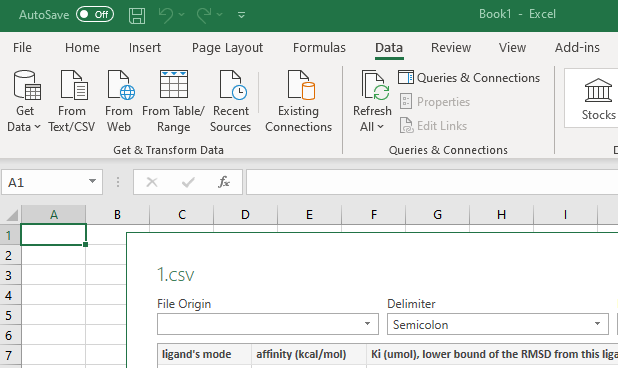
You can import .csv in Excel with any delimiter using Data > From Text/CSV and then select the delimiter:
-
Dear @HUMERA ,
You can import .csv in Excel with any delimiter using Data > From Text/CSV and then select the delimiter:
Dear @dmitriymarin thank you very much. It works.


Hello! It looks like you're interested in this conversation, but you don't have an account yet.
Getting fed up of having to scroll through the same posts each visit? When you register for an account, you'll always come back to exactly where you were before, and choose to be notified of new replies (either via email, or push notification). You'll also be able to save bookmarks and upvote posts to show your appreciation to other community members.
With your input, this post could be even better 💗
Register Login