
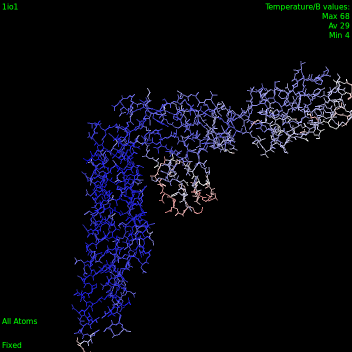
Temperature color schemes
-
-
Here is essentially the code we use in SAMSON when the user does what @Dmitriy-Marin suggested:
// index the current selection

SBPointerIndexer<SBNode> const* selectedNodes = SAMSON::getActiveDocument()->getSelectedNodes();

SBNodeIndexer nodeIndexer;
SB_FOR(SBNode* node, *selectedNodes) nodeIndexer.addNode(node);

// make the color change undoable (start holding changes to the document)

SAMSON::beginHolding("Color per temperature factor");

// remove existing materials from selected nodes and their descendants

SB_FOR(SBNode* node, *selectedNodes) {

    SBNodeIndexer nodeIndexer;
    node->getNodes(nodeIndexer);

    SB_FOR(SBNode* descendantNode, nodeIndexer) descendantNode->removeMaterial();

}

// apply the new color scheme

SB_FOR(SBNode* node, *selectedNodes) {

    SBNodeMaterial* nodeMaterial = new SBNodeMaterial();
    if (!node->addMaterial(nodeMaterial)) delete nodeMaterial;

    SBNodeColorScheme* colorScheme = new SBDColorSchemePerTemperatureFactor(nodeIndexer);
    node->getMaterial()->setColorScheme(colorScheme);

}

// stop holding changes to the document

SAMSON::endHolding();
The reason we index the current selection in
nodeIndexer(which is passed to the color scheme) is
so that the color scheme can traverse these nodes, and their descendants, and determine the minimum and maximum values of the temperature factor.Other color schemes are usable:
- SBDColorSchemeConstant
- SBDColorSchemeCPK
- SBDColorSchemePerChainID
- SBDColorSchemePerFormalCharge
- SBDColorSchemePerOccupancy
- SBDColorSchemePerPartialCharge
- SBDColorSchemePerResidueSequenceNumber
- SBDColorSchemePerResidueType
- SBDColorSchemePerSecondaryStructureType
-
Here is essentially the code we use in SAMSON when the user does what @Dmitriy-Marin suggested:
// index the current selection

SBPointerIndexer<SBNode> const* selectedNodes = SAMSON::getActiveDocument()->getSelectedNodes();

SBNodeIndexer nodeIndexer;
SB_FOR(SBNode* node, *selectedNodes) nodeIndexer.addNode(node);

// make the color change undoable (start holding changes to the document)

SAMSON::beginHolding("Color per temperature factor");

// remove existing materials from selected nodes and their descendants

SB_FOR(SBNode* node, *selectedNodes) {

    SBNodeIndexer nodeIndexer;
    node->getNodes(nodeIndexer);

    SB_FOR(SBNode* descendantNode, nodeIndexer) descendantNode->removeMaterial();

}

// apply the new color scheme

SB_FOR(SBNode* node, *selectedNodes) {

    SBNodeMaterial* nodeMaterial = new SBNodeMaterial();
    if (!node->addMaterial(nodeMaterial)) delete nodeMaterial;

    SBNodeColorScheme* colorScheme = new SBDColorSchemePerTemperatureFactor(nodeIndexer);
    node->getMaterial()->setColorScheme(colorScheme);

}

// stop holding changes to the document

SAMSON::endHolding();
The reason we index the current selection in
nodeIndexer(which is passed to the color scheme) is
so that the color scheme can traverse these nodes, and their descendants, and determine the minimum and maximum values of the temperature factor.Other color schemes are usable:
- SBDColorSchemeConstant
- SBDColorSchemeCPK
- SBDColorSchemePerChainID
- SBDColorSchemePerFormalCharge
- SBDColorSchemePerOccupancy
- SBDColorSchemePerPartialCharge
- SBDColorSchemePerResidueSequenceNumber
- SBDColorSchemePerResidueType
- SBDColorSchemePerSecondaryStructureType
-
-
By the way, sorry, I just fixed the code above (replaced Core and Data with SAMSON) (thanks @Dmitriy-Marin !)
-
If you want a custom colorization according to the temperature factor, you can use the same algorithm which @Stephane-Redon showed above and colorize atoms according to the
node->getTemperatureFactor()using your own color scheme:float red = node->getTemperatureFactor() / maximalTemperatureFactor; // should be scaled to 1.0 SBDColorSchemeConstant *colorScheme = new SBDColorSchemeConstant(red, 0.0, 0.0, 1.0); //SBDColorSchemeConstant (float red, float green, float blue, float alpha=1.0f) node->getMaterial()->setColorScheme(colorScheme);You can create more advanced color scheme by setting the HSV color space based on the temperatureFactor and converting it to the RGB color space.
-
If you want a custom colorization according to the temperature factor, you can use the same algorithm which @Stephane-Redon showed above and colorize atoms according to the
node->getTemperatureFactor()using your own color scheme:float red = node->getTemperatureFactor() / maximalTemperatureFactor; // should be scaled to 1.0 SBDColorSchemeConstant *colorScheme = new SBDColorSchemeConstant(red, 0.0, 0.0, 1.0); //SBDColorSchemeConstant (float red, float green, float blue, float alpha=1.0f) node->getMaterial()->setColorScheme(colorScheme);You can create more advanced color scheme by setting the HSV color space based on the temperatureFactor and converting it to the RGB color space.
-
Here is essentially the code we use in SAMSON when the user does what @Dmitriy-Marin suggested:
// index the current selection

SBPointerIndexer<SBNode> const* selectedNodes = SAMSON::getActiveDocument()->getSelectedNodes();

SBNodeIndexer nodeIndexer;
SB_FOR(SBNode* node, *selectedNodes) nodeIndexer.addNode(node);

// make the color change undoable (start holding changes to the document)

SAMSON::beginHolding("Color per temperature factor");

// remove existing materials from selected nodes and their descendants

SB_FOR(SBNode* node, *selectedNodes) {

    SBNodeIndexer nodeIndexer;
    node->getNodes(nodeIndexer);

    SB_FOR(SBNode* descendantNode, nodeIndexer) descendantNode->removeMaterial();

}

// apply the new color scheme

SB_FOR(SBNode* node, *selectedNodes) {

    SBNodeMaterial* nodeMaterial = new SBNodeMaterial();
    if (!node->addMaterial(nodeMaterial)) delete nodeMaterial;

    SBNodeColorScheme* colorScheme = new SBDColorSchemePerTemperatureFactor(nodeIndexer);
    node->getMaterial()->setColorScheme(colorScheme);

}

// stop holding changes to the document

SAMSON::endHolding();
The reason we index the current selection in
nodeIndexer(which is passed to the color scheme) is
so that the color scheme can traverse these nodes, and their descendants, and determine the minimum and maximum values of the temperature factor.Other color schemes are usable:
- SBDColorSchemeConstant
- SBDColorSchemeCPK
- SBDColorSchemePerChainID
- SBDColorSchemePerFormalCharge
- SBDColorSchemePerOccupancy
- SBDColorSchemePerPartialCharge
- SBDColorSchemePerResidueSequenceNumber
- SBDColorSchemePerResidueType
- SBDColorSchemePerSecondaryStructureType
@stephane-redon Hi Sir,
I am trying the example above and I have an error when I compile: error: expected type-specifier before ‘SBDColorSchemePerTemperatureFactor’
SBNodeColorScheme* colorScheme = new SBDColorSchemePerTemperatureFactor(nodeIndexer);Would you mind helping me with this error, please?
-
@stephane-redon Hi Sir,
I am trying the example above and I have an error when I compile: error: expected type-specifier before ‘SBDColorSchemePerTemperatureFactor’
SBNodeColorScheme* colorScheme = new SBDColorSchemePerTemperatureFactor(nodeIndexer);Would you mind helping me with this error, please?
-


Hello! It looks like you're interested in this conversation, but you don't have an account yet.
Getting fed up of having to scroll through the same posts each visit? When you register for an account, you'll always come back to exactly where you were before, and choose to be notified of new replies (either via email, or push notification). You'll also be able to save bookmarks and upvote posts to show your appreciation to other community members.
With your input, this post could be even better 💗
Register Login