Skip to content
0
  • Recent
  • Tags
  • Popular
  • SAMSON Connect
  • Get SAMSON
  • Recent
  • Tags
  • Popular
  • SAMSON Connect
  • Get SAMSON
Collapse
SAMSON Forum
  1. Home
  2. Develop
  3. Apps
  4. Editor names not showing in GUI

Editor names not showing in GUI

Scheduled Pinned Locked Moved Apps
3 Posts 2 Posters 3.4k Views 1 Watching
  • Oldest to Newest
  • Newest to Oldest
  • Most Votes
Reply
  • Reply as topic
Log in to reply
This topic has been deleted. Only users with topic management privileges can see it.
  • E
    E
    Elisa
    wrote on last edited by
    #1

    Hi!

    Our Samson element has several editors. The icons and descriptions are showing perfectly in the GUI, but the editor names are missing:
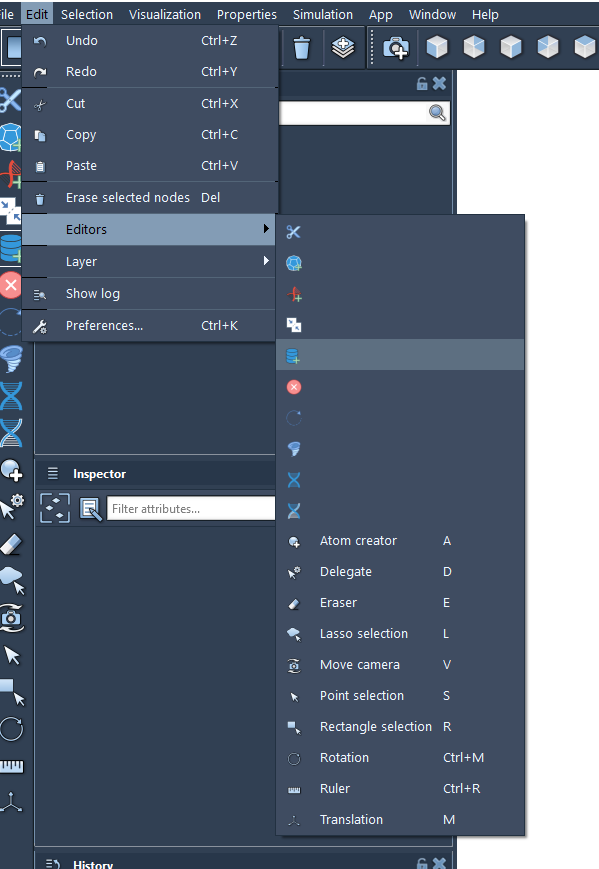
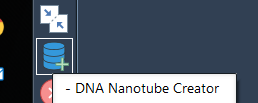
    1_1549894945605_example2.png 0_1549894945603_example1.png

    The getName() methods on the editor's GUI sources are set, as well as other methods in the editor sources like getToolTip() and getText(). Am I missing somethig?

    Best regards,

    Elisa

    1 Reply Last reply
    1
    • DmitriyMarinD
      DmitriyMarinD
      DmitriyMarin
      wrote on last edited by
      #2

      Yes, it is a bug, which will be fixed in the next SDK version.

      You need to implement getDescription() function in you editor.
      Add the following line in the header file of your editor:

      virtual QString	getDescription() const;	///< Returns the menu item text
      

      And in the source file:

      QString SEAwesomeEditor::getDescription() const {
      
      	return QObject::tr("Awesome editor");
      
      }
      

      Dmitriy,
      The SAMSON Team, https://s-c.io

      1 Reply Last reply
      2
      • E
        E
        Elisa
        wrote on last edited by
        #3

        Thanks!! Solved!

        1 Reply Last reply
        0

        Hello! It looks like you're interested in this conversation, but you don't have an account yet.

        Getting fed up of having to scroll through the same posts each visit? When you register for an account, you'll always come back to exactly where you were before, and choose to be notified of new replies (either via email, or push notification). You'll also be able to save bookmarks and upvote posts to show your appreciation to other community members.

        With your input, this post could be even better 💗

        Register Login
        Reply
        • Reply as topic
        Log in to reply
        • Oldest to Newest
        • Newest to Oldest
        • Most Votes


        • Login

        • Login or register to search.
        • First post
          Last post
