Skip to content

Modeling

13 Topics 116 Posts

Everything about the development of structural, visual, interaction and property models

  • Python bindings for my custom model

    58
    1 Votes
    58 Posts
    89k Views
    DmitriyMarinD
    To update the topic and for information: If you are looking for instructions on how to create Python bindings for your SAMSON Extension, please refer to the Developer Guide: Creation of Python Bindings for SAMSON Extensions.
  • Van der Waals Tutorial - Casting Shadows

    4
    1
    0 Votes
    4 Posts
    3k Views
    DmitriyMarinD
    Dear @Lauren , We have updated the Creating visualizations: Van der Waals visual model tutorial in our Developer Guide. You can also check out the code samples corresponding to this tutorial here: https://github.com/1A-OneAngstrom/SAMSON-Developer-Tutorials/tree/master/VanDerWaals. The code samples contain more optimized code and some additional functionality.
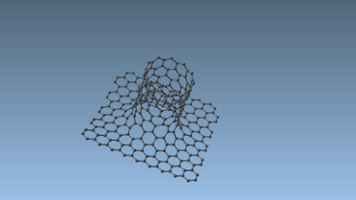
  • How to do a carbon nanotube attached in a graphene sheet?

    3
    2
    0 Votes
    3 Posts
    4k Views
    DmitriyMarinD
    Alternatively, you can do this without the Brenner interaction model but with the built-in minimization which uses the Universal Force Field (UFF) and the Add editor (shortcut: A) (it's Carbon by default). First, you will need to modify SAMSON preferences (Ctrl+K): -1- For the Add editor, disable the "Adjust hydrogens ..." option. [image: 0_1600418725406_Preferences-Add-no-adjust-H.png] -2- For the Minimization, disable the "Warn me when hydrogens appear to be missing" warning to prevent it from poping-up on each new bond connection. [image: 0_1600418739623_Preferences-Minimize-no-H-warning.png] Then you can apply the minimization: Home >Simulate > Minimize. Start connecting atoms in the nanotube and the graphene sheet using the Add editor (A) - to create a bond simply connect two atoms with this editor.
  • Applying rotations to my custom model

    3
    0 Votes
    3 Posts
    4k Views
    E
    Dear Stephane, Yes, we have atoms. The 0.8.0 solution will be the best long-term, as we are dealing with large systems and FPS drop a lot when translating or rotating, but for now I will check the ParticlePositionChanged event. Thanks!! Elisa
  • Serialization/Unserialization issues

    17
    1 Votes
    17 Posts
    12k Views
    E
    Hi, I think I found the problem. Some initialization functions in the constructor of my class were overriding the unserialization. I tried to make a quick fix but when I do static casts in the unserialize function, SAMSON is crashing, so I will modify my constructor and check, it will take a bit though. Thanks for your help!
  • Get the atom xyz file coordinates

    5
    0 Votes
    5 Posts
    5k Views
    LaëtitiaL
    oh you're right there is a 100 coefficient, it's giving me the coordinate in pm. Didn't think about that. thank you very much.
  • Inheriting fields in the inspector class and vector fields

    3
    1 Votes
    3 Posts
    3k Views
    E
    Dear Stephane, Thanks for the quick reply. I will add the position in three attributes for now. Looking forward to 0.8.0!
  • Get the position/index of an atom in the document view

    3
    0 Votes
    3 Posts
    4k Views
    L
    Perfect thanks.
  • visibility of elements in the visual model

    Solved
    5
    0 Votes
    5 Posts
    5k Views
    H
    This is already quite helpful, thank you! I will try and see if displayLineSweptSpheres solves the issue. I will post the solution when I've found it! Cheers, Haichao
  • Sharing a child between two nodes

    3
    0 Votes
    3 Posts
    4k Views
    E
    Thank you! I will try it with this. Yes, I meant SBStructuralGroup :)
  • Creating our own predicates

    3
    0 Votes
    3 Posts
    4k Views
    E
    Thank you! Using the GetClass and GetElementUUID methods is enough for my purposes :)
  • Adding SBAtoms to SBGroupNode

    Solved
    4
    0 Votes
    4 Posts
    4k Views
    H
    Thanks, this solves my problem!
  • How to add new fields in the inspector for my custom class ?

    Solved
    5
    0 Votes
    5 Posts
    5k Views
    YassineY
    Awesome ! Thank you guys, you rock ! Yassine