Skip to content
0
  • Recent
  • Tags
  • Popular
  • SAMSON Connect
  • Get SAMSON
  • Recent
  • Tags
  • Popular
  • SAMSON Connect
  • Get SAMSON
Collapse
SAMSON Forum
  1. Home
  2. Develop
  3. Modeling
  4. Python bindings for my custom model

Python bindings for my custom model

Scheduled Pinned Locked Moved Modeling
58 Posts 2 Posters 89.4k Views 1 Watching
  • Oldest to Newest
  • Newest to Oldest
  • Most Votes
Reply
  • Reply as topic
Log in to reply
This topic has been deleted. Only users with topic management privileges can see it.
  • DmitriyMarinD
    DmitriyMarinD
    DmitriyMarin
    wrote on last edited by
    #18

    What OS do you use?
    Could you, please, check the environment variables for which Python paths are set there?

    Dmitriy,
    The SAMSON Team, https://s-c.io

    1 Reply Last reply
    0
    • E
      E
      Elisa
      wrote on last edited by
      #19

      Yes, I'm using Windows 10, and the Path variables for anaconda3 are set (I added them when installing). I will try to install Anaconda3 for all users, in case the problem comes from this.

      1 Reply Last reply
      0
      • DmitriyMarinD
        DmitriyMarinD
        DmitriyMarin
        wrote on last edited by
        #20

        It should not be a problem, it should work for a user installation. On my Windows 10 I have it installed only for my user.

        Dmitriy,
        The SAMSON Team, https://s-c.io

        1 Reply Last reply
        0
        • DmitriyMarinD
          DmitriyMarinD
          DmitriyMarin
          wrote on last edited by
          #21

          To see the SAMSON log on Windows, you can open a terminal (Power Shell) and launch SAMSON from there (provide the full path to the SAMSON executable or launch from where it is installed):

          .\SAMSON-Core.exe --logfile="samson.log"
          

          Then you can open the log file and search for the line: "Python Scripting: initialization ..."
          Could you, please, post here what you have in this log after this line (related to the Python Scripting).

          Dmitriy,
          The SAMSON Team, https://s-c.io

          1 Reply Last reply
          1
          • DmitriyMarinD
            DmitriyMarinD
            DmitriyMarin
            wrote on last edited by
            #22

            By the way, which version of Anaconda3 you installed now, the 64-bit one? Anaconda3-5.2.0-Windows-x86_64.exe (see https://repo.anaconda.com/archive/)?

            Dmitriy,
            The SAMSON Team, https://s-c.io

            1 Reply Last reply
            0
            • E
              E
              Elisa
              wrote on last edited by
              #23

              Yes, I installed the 64bit.

              I think the problem is that I might not have set the appropriate paths. If I execute jupyter qtconsole from within anaconda, it runs fine. But if I try to execute it from the command line, it throws an error saying it can't find PyQt5. I also realized that they added the folder Library/usr/bin to the PATH variable, but in my anaconda installation there is no such folder. I think maybe I'm missing a path.

              DmitriyMarinD 1 Reply Last reply
              0
              • E
                E
                Elisa
                wrote on last edited by Elisa
                #24

                Sorry, I just saw the logging option! I went back to a clean installation of Anaconda3 with python 3.7 to see if I could load by default the jupyter qtconsole from cmd. So now the error is:

                ===================================================================
                "7B654CE6-E38C-B97F-6746-4FD6934487C2.dll"  Errors
                -------------------------------------------------------------------
                >  "Cannot load library"
                       "Sorry I cannot help you"
                ===================================================================
                ===================================================================
                7B654CE6-E38C-B97F-6746-4FD6934487C2.dll Errors
                ------------------------------------------------------------------
                > Cannot load library
                      Sorry I cannot help you
                
                DmitriyMarinD 1 Reply Last reply
                0
                • E Elisa

                  Sorry, I just saw the logging option! I went back to a clean installation of Anaconda3 with python 3.7 to see if I could load by default the jupyter qtconsole from cmd. So now the error is:

                  ===================================================================
                  "7B654CE6-E38C-B97F-6746-4FD6934487C2.dll"  Errors
                  -------------------------------------------------------------------
                  >  "Cannot load library"
                         "Sorry I cannot help you"
                  ===================================================================
                  ===================================================================
                  7B654CE6-E38C-B97F-6746-4FD6934487C2.dll Errors
                  ------------------------------------------------------------------
                  > Cannot load library
                        Sorry I cannot help you
                  
                  DmitriyMarinD
                  DmitriyMarinD
                  DmitriyMarin
                  wrote on last edited by
                  #25

                  @Elisa
                  This error means that it was not possible to load the module, in the case of the Python Scripting Element it is probably due to the wrong python library version (since Python Scripting is compiled and linked against python3.6 library).

                  Dmitriy,
                  The SAMSON Team, https://s-c.io

                  1 Reply Last reply
                  0
                  • E Elisa

                    Yes, I installed the 64bit.

                    I think the problem is that I might not have set the appropriate paths. If I execute jupyter qtconsole from within anaconda, it runs fine. But if I try to execute it from the command line, it throws an error saying it can't find PyQt5. I also realized that they added the folder Library/usr/bin to the PATH variable, but in my anaconda installation there is no such folder. I think maybe I'm missing a path.

                    DmitriyMarinD
                    DmitriyMarinD
                    DmitriyMarin
                    wrote on last edited by DmitriyMarin
                    #26

                    @Elisa

                    If you have installed Anaconda3 you have PyQt5 installed. Apparently, the error when you launch Jupyter QtConsole from the command line and it cannot find PyQt5 is due to a conflict with your Qt installation (e.g. Qt 5.9.3) either because of the order in the PATH environment variable or, if you were changing versions of packages in your anaconda installation, because of the not suitable version of PyQt5 for jupyter qtconsole (but then it would not allow launching it from within the anaconda).

                    Could you, please, check the PATH environment variables (the system one and the user one).

                    Dmitriy,
                    The SAMSON Team, https://s-c.io

                    1 Reply Last reply
                    0
                    • DmitriyMarinD
                      DmitriyMarinD
                      DmitriyMarin
                      wrote on last edited by
                      #27

                      This is how the user Path environment variable looks like for my installation on Win10:
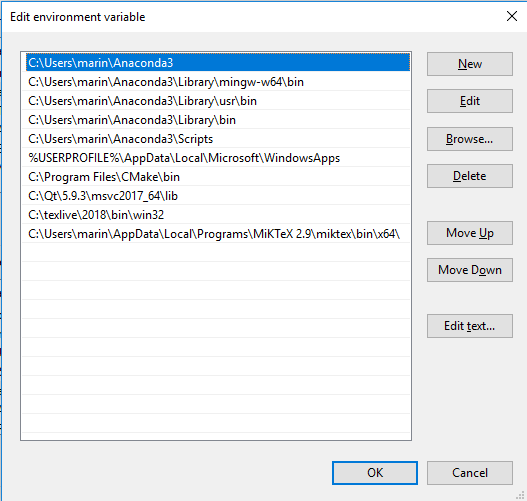
                      0_1544117611766_PathUserEnvVar.png

                      Dmitriy,
                      The SAMSON Team, https://s-c.io

                      1 Reply Last reply
                      0
                      • E
                        E
                        Elisa
                        wrote on last edited by
                        #28

                        I checked the path environment, but it looks like yours, I also have there Qt\5.8\msvc2015_64\bin and Qt\5.8\msvc2015_64\lib (makes no difference if I add them or remove them). I must have broken the Python installation at some point, I also think the problem is on my side, probably regarding the paths. I will keep looking!

                        1 Reply Last reply
                        0
                        • DmitriyMarinD
                          DmitriyMarinD
                          DmitriyMarin
                          wrote on last edited by
                          #29

                          Sorry again for the issue!
                          The Python Scripting Element is quite dependent on particular version of python and might be on versions of some packages (e.g., jupyter qtconsole) as well.

                          If you think that it is due to your broken Anaconda3 installation, I would advice you to uninstall all the anaconda installations (check the Path environment variables as well), restart your PC and install the Anaconda3-5.2.0-Windows-x86_64.exe (https://repo.anaconda.com/archive/Anaconda3-5.2.0-Windows-x86_64.exe).

                          Dmitriy,
                          The SAMSON Team, https://s-c.io

                          1 Reply Last reply
                          0
                          • E
                            E
                            Elisa
                            wrote on last edited by
                            #30

                            With the Anaconda3-5.2 installer it worked! I don't know if maybe downgrading from 5.3 broke some dependencies or some packages where not downgraded to the same versions, or if there were traces of the previous versions somehow, but now it works.

                            Thanks for your help and best regards,

                            Elisa

                            1 Reply Last reply
                            1
                            • DmitriyMarinD
                              DmitriyMarinD
                              DmitriyMarin
                              wrote on last edited by
                              #31

                              Great! Sorry again for the issue and all the installations and reinstallations you had to do.

                              We had the same problem after upgrading from an older version of Python to Python 3.6 via Anaconda3. And the clean installation helped.

                              Dmitriy,
                              The SAMSON Team, https://s-c.io

                              1 Reply Last reply
                              1
                              • DmitriyMarinD
                                DmitriyMarinD
                                DmitriyMarin
                                wrote on last edited by
                                #32

                                Dear @Elisa

                                I prepared a tutorial on how to create Python bindings for a SAMSON Element.

                                For now, it does not describe how to create Python bindings for functions which return or receive SBQuantity or SBDType* - I will add a tutorial on it later.

                                Dmitriy,
                                The SAMSON Team, https://s-c.io

                                1 Reply Last reply
                                1
                                • E
                                  E
                                  Elisa
                                  wrote on last edited by Elisa
                                  #33

                                  Dear @DmitriyMarin ,

                                  Thank you for the information. I was able to create python bindings for my model, although I had to add:

                                  py::class_<SBStructuralModel>(m, "SBStructuralModel");
                                  

                                  Before exposing my structural model, otherwise it was throwing an error when importing my module in python, that SBStructuralModel was an unknown type (in Python). After this, it is working great!!

                                  I found a small problem, and it is to modify a structural model that has already been created in Python. For example, I create a simple structural model with a chain and some nucleotides, then through my own exposed functions I create it in the data graph. If I then try to add to this structural model (for which I still have a variable in python), another chain, it doesn't seem to be added properly and my visual model does weird things. It is not critical for what I could do, but perhaps I am missing something? I am noob with pybind11, and I'm still going over the doc.

                                  Thanks again for your help and sorry for the late reply!

                                  1 Reply Last reply
                                  0
                                  • DmitriyMarinD
                                    DmitriyMarinD
                                    DmitriyMarin
                                    wrote on last edited by
                                    #34

                                    Dear @Elisa ,

                                    I am glad that you were able to create your own Python bindings, I hope it will make your work easier. ;)

                                    Concerning the SBStructuralModel, it is exposed as SBMStructuralModel and can be found in Python bindings as follows: sam.Modeling.StructuralModel.StructuralModel. It is exposed like that:

                                    py::class_<SBMStructuralModel, std::unique_ptr<SBMStructuralModel, py::nodelete>, SBMModel>(m, "StructuralModel")
                                    

                                    Unfortunately, I cannot check right now the origin of the error you have. Could you, please, try adding into the exposure of your custom structural model the following: std::unique_ptr<MyCustomStructuralModel, py::nodelete>, where MyCustomStructuralModel is the name of your structural model class:

                                    py::class_<MyCustomStructuralModel, std::unique_ptr<MyCustomStructuralModel, py::nodelete>, SBMStructuralModel>(m, "MyCustomStructuralModel")
                                    

                                    See pybind11 documentation "Non-public destructors" section for more information. This might resolve your second issue as well.

                                    Dmitriy,
                                    The SAMSON Team, https://s-c.io

                                    1 Reply Last reply
                                    0
                                    • E
                                      E
                                      Elisa
                                      wrote on last edited by
                                      #35

                                      I also get the error if I use SBMStructuralModel:

                                      ImportError: generic_type: type "MyCustomModel" referenced unknown base type "SBMStructuralModel"
                                      

                                      It doesn't seem a problem with the typedef, as adding before exposing my model py::class_<SBStructuralModel>(m, "SBStructuralModel"); gets it working regardless of the alias used.

                                      Best regards,

                                      Elisa

                                      1 Reply Last reply
                                      0
                                      • DmitriyMarinD
                                        DmitriyMarinD
                                        DmitriyMarin
                                        wrote on last edited by
                                        #36

                                        Yes, there is no difference between SBStructuralModel and SBMStructuralModel since it's a typedef, I just wanted to note that it is already exposed by the Python Scripting SAMSON Element and therefore, you do not need to expose it in your SAMSON Element.

                                        When you expose your own custom structural model, you just need to provide the base class (i.e., SBStructuralModel) and the class type (the class type also depends on the class type of the base class). For a custom structural model it should be as follows (please, see the PyBindTutorial sample):

                                        py::class_<
                                        	CustomStructuralModel,					/* the class */
                                        	std::unique_ptr<CustomStructuralModel, py::nodelete>,	/* the class type */
                                        	SBStructuralModel					/* the base class */
                                        	>
                                        	c(m,							/* pybind11::module */
                                        	"CustomStructuralModel"					/* the class name in python*/
                                        	);
                                        

                                        Then in Python Scripting you could do something like this:

                                        import SE_F2078F9E_F2CB_BA72_EE86_1E01A10B63D4 as tutorial	# import your module
                                        structuralModel = tutorial.CustomStructuralModel()		# construct a custom structural model
                                        structuralModel.create()					# create it
                                        layer = SAMSON.getActiveLayer()					# get active layer
                                        layer.addChild(structuralModel)					# add the custom structural model to the active layer
                                        structuralRoot = structuralModel.getStructuralRoot()		# get the structural root of the custom structural model
                                        group1 = tutorial.CustomStructuralGroup('group 1')		# construct a custom structural group or other type of data graph node
                                        group1.create()							# create it
                                        structuralRoot.addChild(group1)					# add it to the custom structural model
                                        group2 = tutorial.CustomStructuralGroup('group 2')
                                        group2.create()
                                        structuralRoot.addChild(group2)
                                        

                                        Dmitriy,
                                        The SAMSON Team, https://s-c.io

                                        1 Reply Last reply
                                        0
                                        • E
                                          E
                                          Elisa
                                          wrote on last edited by
                                          #37

                                          That is not working for me, I get the error I posted before unless before that statement I add py::class_<SBStructuralModel>(m, "SBStructuralModel"); before exposing my structural model when importing in the Python Scripting console.

                                          1 Reply Last reply
                                          0

                                          Hello! It looks like you're interested in this conversation, but you don't have an account yet.

                                          Getting fed up of having to scroll through the same posts each visit? When you register for an account, you'll always come back to exactly where you were before, and choose to be notified of new replies (either via email, or push notification). You'll also be able to save bookmarks and upvote posts to show your appreciation to other community members.

                                          With your input, this post could be even better 💗

                                          Register Login
                                          Reply
                                          • Reply as topic
                                          Log in to reply
                                          • Oldest to Newest
                                          • Newest to Oldest
                                          • Most Votes


                                          • Login

                                          • Login or register to search.
                                          • First post
                                            Last post
