Skip to content
0
  • Recent
  • Tags
  • Popular
  • SAMSON Connect
  • Get SAMSON
  • Recent
  • Tags
  • Popular
  • SAMSON Connect
  • Get SAMSON
Collapse
SAMSON Forum
  1. Home
  2. SAMSON
  3. SAMSON Extensions
  4. Adenita installation

Adenita installation

Scheduled Pinned Locked Moved SAMSON Extensions
24 Posts 4 Posters 28.6k Views 1 Watching
  • Oldest to Newest
  • Newest to Oldest
  • Most Votes
Reply
  • Reply as topic
Log in to reply
This topic has been deleted. Only users with topic management privileges can see it.
  • P
    P
    Phuong
    wrote on last edited by
    #7

    I downloaded from the link they provided but I still cannot find Adenita in Samson app. It doesn't mean that I cannot use Adenita, but I cannot find that element in the program even though I added it online.

    DmitriyMarinD 1 Reply Last reply
    0
    • P Phuong

      I downloaded from the link they provided but I still cannot find Adenita in Samson app. It doesn't mean that I cannot use Adenita, but I cannot find that element in the program even though I added it online.

      DmitriyMarinD
      DmitriyMarinD
      DmitriyMarin
      wrote on last edited by
      #8

      @phuong
      What do you mean that you can use it but you cannot find it?
      The Adenita module is not an App but a set of editors, therefore it will be present in the Editors menu, e.g. Editors > All. To easily access the most used editors, you can add them to favorites by clicking on a star next to its name.

      To check whether you have the module installed, go to Interface > Show log, and type Adenita in the filter - you either will see two lines (red if there was a problem loading a module) or nothing if it is not installed at all (see the image below).

      0_1585586253521_9c1930ea-1e12-4e08-8ef4-2f65705b278f-image.png

      Dmitriy,
      The SAMSON Team, https://s-c.io

      1 Reply Last reply
      0
      • P
        P
        Phuong
        wrote on last edited by
        #9

        I followed what you said, and it showed that Adenita is not installed.

        DmitriyMarinD 1 Reply Last reply
        0
        • P Phuong

          I followed what you said, and it showed that Adenita is not installed.

          DmitriyMarinD
          DmitriyMarinD
          DmitriyMarin
          wrote on last edited by
          #10

          @phuong
          Could you please verify which version of SAMSON you have installed (Interface > Preferences > Setup > General). It should be 0.8.5.

          0_1585588738135_34228a9a-4607-4610-a30b-19b2a155c35f-image.png

          And could you please login on samson-connect.net and check the state of the Adenita element - what is written on the button, is it Add or something else?
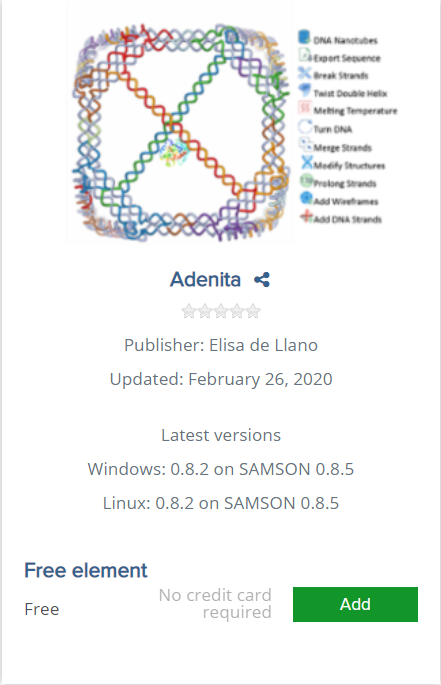
          0_1585588781098_7e82b8ca-f360-4708-a3ce-96d7567b63f2-image.png

          Dmitriy,
          The SAMSON Team, https://s-c.io

          P 2 Replies Last reply
          0
          • DmitriyMarinD DmitriyMarin

            @phuong
            Could you please verify which version of SAMSON you have installed (Interface > Preferences > Setup > General). It should be 0.8.5.
            0_1585588738135_34228a9a-4607-4610-a30b-19b2a155c35f-image.png

            And could you please login on samson-connect.net and check the state of the Adenita element - what is written on the button, is it Add or something else?
            0_1585588781098_7e82b8ca-f360-4708-a3ce-96d7567b63f2-image.png

            P
            P
            Phuong
            wrote on last edited by
            #11
            This post is deleted!
            1 Reply Last reply
            0
            • DmitriyMarinD DmitriyMarin

              @phuong
              Could you please verify which version of SAMSON you have installed (Interface > Preferences > Setup > General). It should be 0.8.5.
              0_1585588738135_34228a9a-4607-4610-a30b-19b2a155c35f-image.png

              And could you please login on samson-connect.net and check the state of the Adenita element - what is written on the button, is it Add or something else?
              0_1585588781098_7e82b8ca-f360-4708-a3ce-96d7567b63f2-image.png

              P
              P
              Phuong
              wrote on last edited by
              #12

              Hi @dmitriymarin ,
              I am sorry for this late reply. I did what you asked and I linked the pictures below.
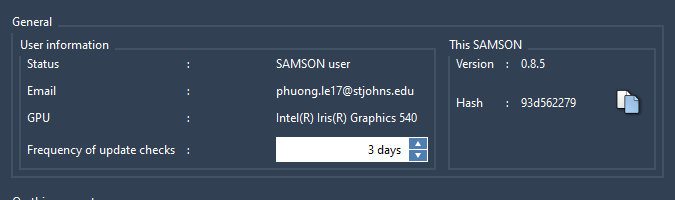
              0_1585612050813_15fc6e26-ea19-473c-8965-6739d44b825f-image.png
              0_1585612072415_32e14f4b-8c2b-4656-bce8-ded407b7cd1f-image.png

              DmitriyMarinD 1 Reply Last reply
              0
              • P Phuong

                Hi @dmitriymarin ,
                I am sorry for this late reply. I did what you asked and I linked the pictures below.
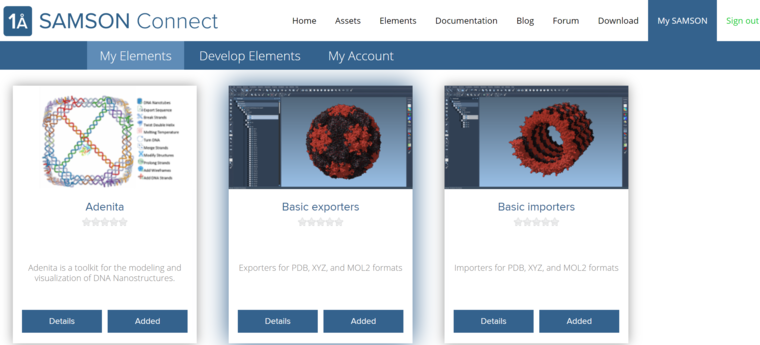
                0_1585612050813_15fc6e26-ea19-473c-8965-6739d44b825f-image.png
                0_1585612072415_32e14f4b-8c2b-4656-bce8-ded407b7cd1f-image.png

                DmitriyMarinD
                DmitriyMarinD
                DmitriyMarin
                wrote on last edited by
                #13

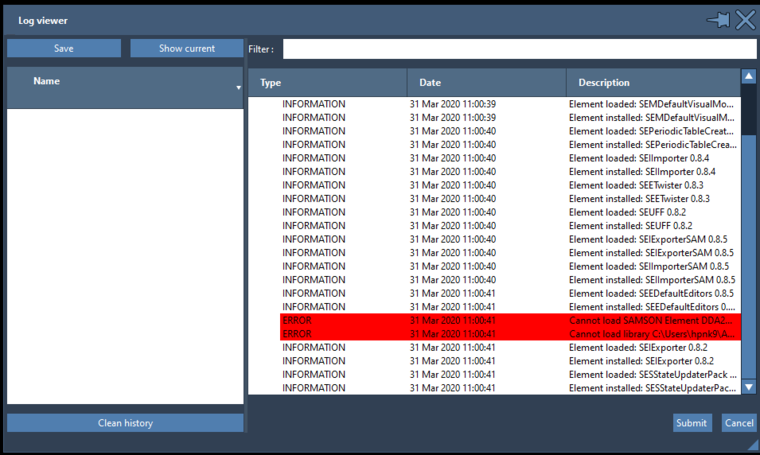
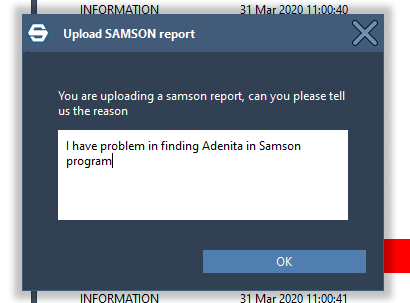
                Thank you, @Phuong ! This looks ok. Could you please submit the log: go to Interface menu > Control > Show log, then press the Show current (in the top-left corner of the Log viewer window) and then press Submit (in the bottom-right corner of the Log viewer window) with some information that it is from you about Adenita.
                Thank you in advance!

                Dmitriy,
                The SAMSON Team, https://s-c.io

                1 Reply Last reply
                0
                • P
                  P
                  Phuong
                  wrote on last edited by
                  #14

                  Hi @DmitriyMarin,
                  0_1585667113313_7386c89b-0035-4d2e-b4fe-4177714bccbe-image.png
                  0_1585667172388_3a8776b0-fdf6-4f9c-826b-41f8f78d43f3-image.png
                  I hope this is what you want me to do. Thank you so much for your help!

                  DmitriyMarinD 1 Reply Last reply
                  1
                  • P Phuong

                    Hi @DmitriyMarin,
                    0_1585667113313_7386c89b-0035-4d2e-b4fe-4177714bccbe-image.png
                    0_1585667172388_3a8776b0-fdf6-4f9c-826b-41f8f78d43f3-image.png
                    I hope this is what you want me to do. Thank you so much for your help!

                    DmitriyMarinD
                    DmitriyMarinD
                    DmitriyMarin
                    wrote on last edited by
                    #15

                    @phuong Great! Thank you! We will have a look.

                    Dmitriy,
                    The SAMSON Team, https://s-c.io

                    1 Reply Last reply
                    0
                    • StephaneS
                      StephaneS
                      Stephane
                      wrote on last edited by Stephane
                      #16

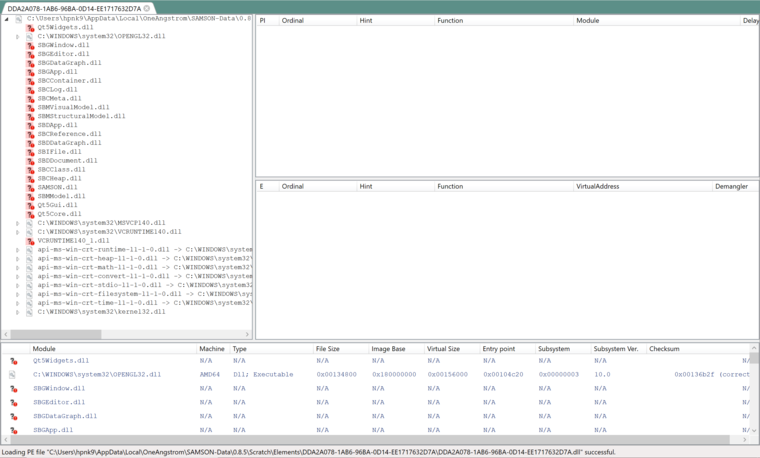
                      Hi @Phuong, could you please analyze the dependencies of the module on your computer?
                      Here's how to do it:

                      • download the Dependencies tool from https://github.com/lucasg/Dependencies/releases/download/v1.10/Dependencies_x64_Release.zip
                      • unzip everything in a folder
                      • run DependenciesGUI.exe
                      • With the DependenciesGUI tool, open the file C:\Users\ [Your user name] \AppData\Local\OneAngstrom\SAMSON-Data\0.8.5\Scratch\Elements\DDA2A078-1AB6-96BA-0D14-EE1717632D7A\DDA2A078-1AB6-96BA-0D14-EE1717632D7A.dll

                      Could you please report which dlls appear to be missing?

                      Thanks,

                      Stephane

                      P 1 Reply Last reply
                      1
                      • StephaneS Stephane

                        Hi @Phuong, could you please analyze the dependencies of the module on your computer?
                        Here's how to do it:

                        • download the Dependencies tool from https://github.com/lucasg/Dependencies/releases/download/v1.10/Dependencies_x64_Release.zip
                        • unzip everything in a folder
                        • run DependenciesGUI.exe
                        • With the DependenciesGUI tool, open the file C:\Users\ [Your user name] \AppData\Local\OneAngstrom\SAMSON-Data\0.8.5\Scratch\Elements\DDA2A078-1AB6-96BA-0D14-EE1717632D7A\DDA2A078-1AB6-96BA-0D14-EE1717632D7A.dll

                        Could you please report which dlls appear to be missing?

                        Thanks,

                        Stephane

                        P
                        P
                        Phuong
                        wrote on last edited by
                        #17

                        hi @stephane-redon,
                        I did follow what you said but there're something different in my computer.
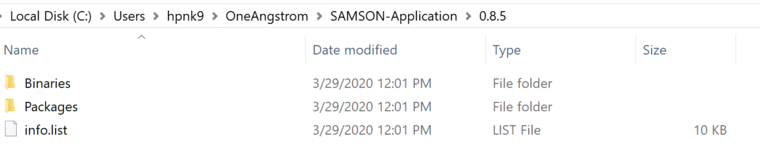
                        0_1585750280540_2ad9f28c-f75b-40c4-beef-54a1352b3b71-image.png
                        I cannot continue since there're no folder named Scratch. Am I doing something wrong?
                        Thanks!

                        1 Reply Last reply
                        0
                        • StephaneS
                          StephaneS
                          Stephane
                          wrote on last edited by
                          #18

                          This does not seem to be the correct folder. You should not go to C:\Users\hpnk9\OneAngstrom but to C:\Users\hpnk9\AppData\Local\OneAngstrom\SAMSON-Data\0.8.5\Scratch\Elements\DDA2A078-1AB6-96BA-0D14-EE1717632D7A. Note that AppData might be hidden, so you might have to show them in explorer settings. (You could also directly copy-paste this path in the explorer).

                          P 1 Reply Last reply
                          1
                          • StephaneS Stephane

                            This does not seem to be the correct folder. You should not go to C:\Users\hpnk9\OneAngstrom but to C:\Users\hpnk9\AppData\Local\OneAngstrom\SAMSON-Data\0.8.5\Scratch\Elements\DDA2A078-1AB6-96BA-0D14-EE1717632D7A. Note that AppData might be hidden, so you might have to show them in explorer settings. (You could also directly copy-paste this path in the explorer).

                            P
                            P
                            Phuong
                            wrote on last edited by
                            #19

                            Hi @stephane-redon,
                            Thank you for your instruction! This is what is shown.
                            0_1585756561513_0db2bb08-c9fb-438e-9747-e46bcdccd55d-image.png

                            1 Reply Last reply
                            0
                            • StephaneS
                              StephaneS
                              Stephane
                              wrote on last edited by
                              #20

                              Thanks. This strongly suggests that the runtime was not installed correctly: vcruntime140_1.dll cannot be found. Please download it from the site indicated in the module description. The direct link is https://aka.ms/vs/16/release/vc_redist.x64.exe.

                              P 1 Reply Last reply
                              1
                              • StephaneS Stephane

                                Thanks. This strongly suggests that the runtime was not installed correctly: vcruntime140_1.dll cannot be found. Please download it from the site indicated in the module description. The direct link is https://aka.ms/vs/16/release/vc_redist.x64.exe.

                                P
                                P
                                Phuong
                                wrote on last edited by
                                #21

                                @stephane-redon I appreciate a lot! I can use Adenita now. Thank you again!

                                1 Reply Last reply
                                0
                                • StephaneS
                                  StephaneS
                                  Stephane
                                  wrote on last edited by
                                  #22

                                  Awesome, you're welcome! Happy designing!

                                  1 Reply Last reply
                                  0
                                  • C
                                    C
                                    charlie
                                    wrote on last edited by
                                    #23

                                    Hi, i have the same problem as Phuong. and the version of SAMSON in my PC(win10) is 0.11.0, can adenita work in that version? @Stephane-Redon

                                    DmitriyMarinD 1 Reply Last reply
                                    0
                                    • C charlie

                                      Hi, i have the same problem as Phuong. and the version of SAMSON in my PC(win10) is 0.11.0, can adenita work in that version? @Stephane-Redon

                                      DmitriyMarinD
                                      DmitriyMarinD
                                      DmitriyMarin
                                      wrote on last edited by
                                      #24

                                      Dear @charlie,

                                      For now, Adenita is provided only for SAMSON with version not higher than 0.8.5, (see Latest versions section on the module's web-page). So, to use Adenita you will need to install SAMSON 0.8.5.

                                      You can request the newer version from the Adenita developer ( @Elisa ) here: https://forum.samson-connect.net/topic/139/user-support-adenita .


                                      Dmitriy,
                                      The SAMSON Team, https://s-c.io

                                      1 Reply Last reply
                                      0

                                      Hello! It looks like you're interested in this conversation, but you don't have an account yet.

                                      Getting fed up of having to scroll through the same posts each visit? When you register for an account, you'll always come back to exactly where you were before, and choose to be notified of new replies (either via email, or push notification). You'll also be able to save bookmarks and upvote posts to show your appreciation to other community members.

                                      With your input, this post could be even better 💗

                                      Register Login
                                      Reply
                                      • Reply as topic
                                      Log in to reply
                                      • Oldest to Newest
                                      • Newest to Oldest
                                      • Most Votes


                                      • Login

                                      • Login or register to search.
                                      • First post
                                        Last post